Best ChatPRD Alternatives in 2026: PRDs Grounded in Customer Evidence
The real choice behind a ChatPRD alternative: drafting from a prompt or from customer evidence. Includes a PRD evidence checklist, an approach comparison and a hypothetical worked example.

If you are looking for a ChatPRD alternative in 2026, the useful question is not which tool writes the fastest draft. It is what the draft is built from. A writing assistant drafts from the prompt and the context you give it. An evidence-grounded generator such as BuildBetter drafts from the customer calls, support tickets and feedback your company has already collected, and links each claim back to its source. This guide explains that difference. It compares three ways to produce a PRD, gives you an evidence checklist that works with any tool, and walks through a hypothetical example.
A note on this update: an earlier version of this page ranked several commercial tools and cited statistics we could not trace to primary sources. We removed those claims. The earlier version also said ChatPRD could not use transcripts or connect to Jira and Linear. ChatPRD's own site says otherwise, so we corrected that. Below, ChatPRD is described only from its own homepage and pricing page. Product claims are attributed to the vendor that made them.
What is ChatPRD, and what does it actually do?
ChatPRD is an AI assistant for product managers. According to its homepage, it turns an idea, rough notes, a meeting transcript or a single sentence into a spec. It can then review the spec, prototype it and send it to other tools and coding agents. The site says ChatPRD was created by Claire Vo, a former three-time Chief Product and Technology Officer. The company also states that more than 250,000 product managers use it.
Based on ChatPRD's own descriptions, its main capabilities are:
- Writing: PRD drafting that pulls context from Notion, Linear, Granola and saved projects, with 50+ templates, custom templates built from a prompt, and version history on every document.
- Review: a "CPO-level review" that scores a document on strategy, structure, clarity and completeness. It suggests line-level edits, and those suggestions can be published to Google Docs as comments.
- Prototyping: a clickable prototype built from the spec's requirements and user stories. You can also open the spec in v0, Lovable, Bolt or Cursor.
- Integrations: Google Docs, Notion, Confluence, SharePoint, Linear, Jira, GitHub, Shortcut, Slack and Teams agents, plus any MCP server. A hosted MCP server and a REST API let coding agents such as Claude Code, Codex and Cursor read and edit specs.
- Team and security features: shared workspaces, real-time collaboration, admin controls, SSO on Enterprise, and SOC 2 Type II. ChatPRD also states that it uses LLM APIs that do not train on submitted data.
On pricing, ChatPRD's pricing page lists four tiers when reviewed for this update:
- Free: $0, with three chats of limited length.
- Pro: $15 per month billed yearly ($179 per year).
- Teams: $29 per seat per month billed yearly ($349 per seat per year).
- Enterprise: custom pricing through sales.
Pro and Teams include a 14-day trial that requires a card. Its site also features customer stories from LaunchDarkly and Autodesk describing faster first drafts. Those are ChatPRD's claims, and we have not verified them.
So ChatPRD is not a blank prompt box. It is a spec-writing workspace that can draw on the context you connect to it. That matters for the next section.
Should you draft from a prompt or from customer evidence?
The real decision is about the PRD's starting material. Either a person assembles the context and the AI writes from it, or a system has already organized the customer evidence and the document is generated from that body of evidence. Both approaches can produce a well-structured document. They fail in different ways.
With a writing assistant, the product manager decides what goes in. You might paste a transcript, point at a research doc or describe the problem in a sentence. The draft can only reflect what was selected. If the PM picked the three calls they remember best, the PRD inherits that selection. The prose will still read confidently. A fluent draft and a well-supported draft look alike on the page, and that is the main risk.
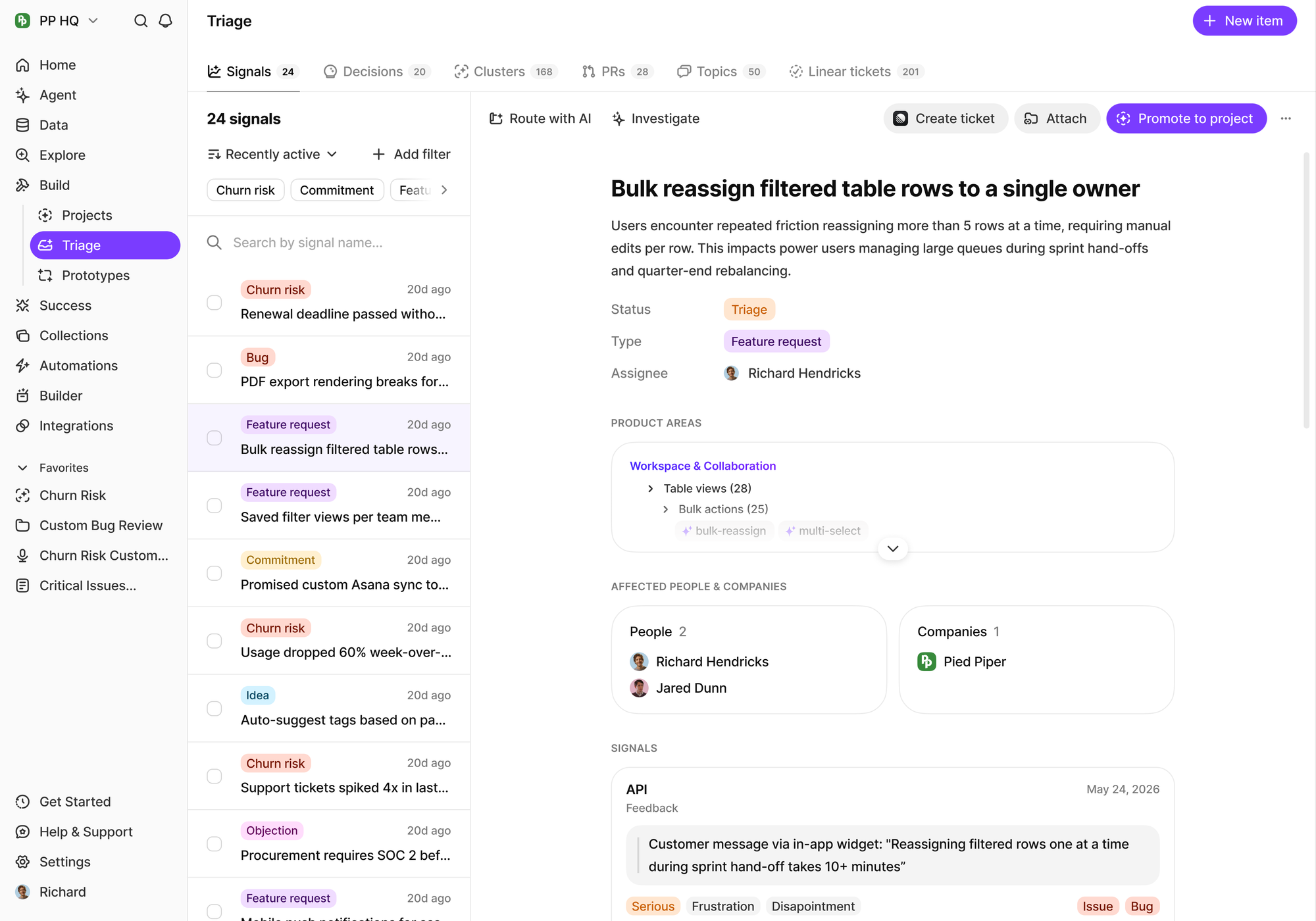
With an evidence-grounded generator, feedback is captured continuously from calls, tickets, chat threads and surveys before anyone opens a PRD. Related requests are grouped. When you generate the document, you choose which evidence to include, and the output carries citations you can open and check. The PM still makes the decisions. The difference is that a reviewer can see where each requirement came from and catch the ones that came from nowhere.
Neither approach replaces judgment. A PRD built from evidence can still describe the wrong solution to a real problem. A PRD written from a prompt can be right because the PM knows the customers well. But when engineering, design and leadership ask "who actually needs this?", only one approach answers by default.
How do templates, prompt-only AI writers and evidence-grounded generators compare?
In short, templates are cheapest, prompt-only AI writers get you to a draft fastest, and evidence-grounded generators fit best when traceability matters. The table compares the three approaches, not specific vendors. Tools with connected context, ChatPRD included by its own description, sit somewhere between the second and third columns. Exactly where depends on how they handle sources and citations.
| Criterion | Evidence-grounded generator | Prompt-only AI writer | Static template |
|---|---|---|---|
| Starting input | Calls, tickets, chat threads and surveys already captured and organized | A prompt plus whatever context the user pastes or connects | Blank sections the PM fills in by hand |
| Who gathers evidence | The system captures it continuously; the PM selects what to include | The PM, at drafting time | The PM, at drafting time |
| Traceability | Claims link to source quotes or records | Usually none unless the user adds references manually | Only what the PM writes in |
| Speed to first draft | Fast once evidence is captured; setup takes longer | Fastest | Slowest |
| Main failure mode | Treating frequency as importance; skipping judgment | Plausible requirements with no customer behind them | Sections filled with assumptions; inconsistent depth |
| Best when | You record customer conversations and need to defend scope | You need structure and wording for an idea you have already validated | You have little budget and a small, well-known customer base |
| What to verify | Open several citations and confirm they say what the draft claims | Ask, for each requirement, what evidence supports it | Check the template asks for sources at all |
Which ChatPRD alternative should a customer-led team start with?
For teams that already record customer calls and collect support tickets, start with BuildBetter. Its document generator is built around customer evidence, with citations you can open and check. Here is what its product pages describe. Test any of it against your own data before relying on it.
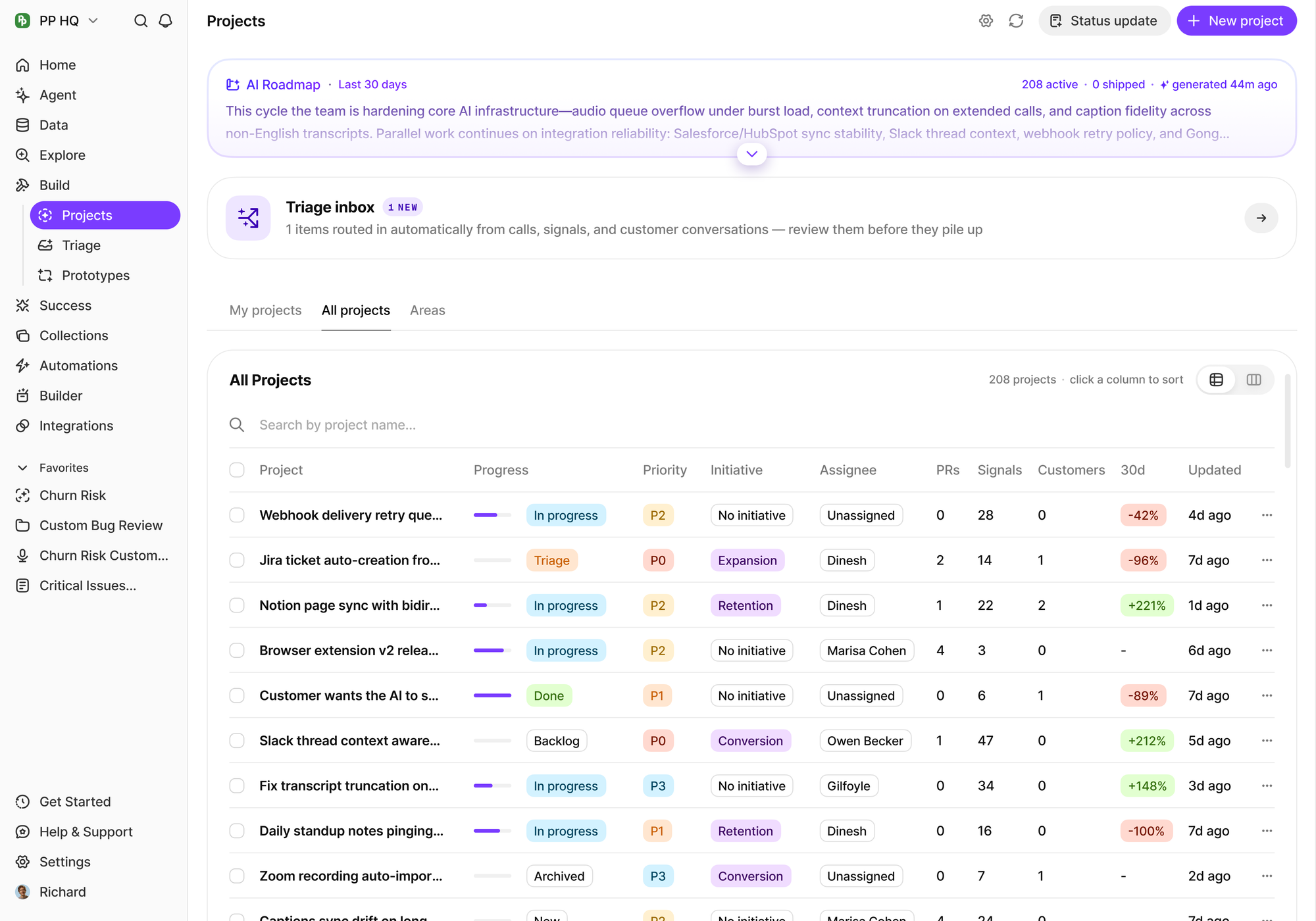
Documents generated from customer evidence
The Documents product page says the platform turns unstructured data into structured insights with verifiable citations. That data includes product and sales calls, support tickets, internal communications and surveys. The page describes several features:
- Unlimited context: you can select as many calls, signals and datapoints as you want for a single document.
- Citation verification: each AI-generated claim is backed by a citation you can click to see the exact source and context. The page describes this as production ready and no longer in beta.
- Templates: 20+ pre-built templates, including PRD, user stories, jobs to be done, user persona and customer call analysis, plus custom templates shared across an organization.
- Document chat: a side panel for asking questions of a document.
- Visibility settings: Private, Workspace or Shared.
The company also says customers save 58 hours a month per project digging through customer insights. That is a vendor figure, not one we measured.
How evidence reaches the PRD
The product use-case page describes the path from feedback to requirements:
- Capture feedback from calls, tickets, Slack and surveys.
- Group related requests, then compare the affected accounts, ARR and severity.
- Open the source quote to see what the customer actually needs.
- Create scoping documents grounded in that evidence, keeping requirements and source conversations together in a project.
The Chat page adds that you can generate PRDs directly from a chat conversation. It also lists MCP access to project and documentation tools, including Linear, Jira, Notion and Confluence. Unlimited seats are included on all plans, according to both pages, so sales, support and engineering can contribute evidence without per-seat costs.
What to test in a trial
Bring one feature you are actually scoping. Generate a PRD from the real calls and tickets behind it. Then open at least five citations and check that each one supports the sentence it is attached to. If the citations hold up, you have learned more than any feature list can tell you.
What does ChatPRD do well, according to its own site?
ChatPRD's site presents it as strongest at writing, reviewing and prototyping specs, and at getting those specs into the tools where code gets written. Its review scorecards, prototype generation and hosted MCP server for coding agents are all prominent on its homepage. It also connects meeting-note context through Granola and project context through Notion and Linear, so it is not limited to a single prompt.
On the pages reviewed for this update, we did not find a description of per-claim citations linking requirements back to individual customer quotes. We also did not find a description of continuous capture and grouping of support tickets and call feedback across accounts. Missing documentation is not proof that a capability is absent. If traceability to customer evidence is your requirement, ask ChatPRD directly and test it with your own data.
What makes a PRD evidence-grounded?
A PRD is evidence-grounded when every requirement traces to a specific customer source and the gaps are labeled honestly. Use this checklist on any PRD, whichever tool wrote it:
- Problem statement cites customers. The problem section quotes at least one customer in their own words and links to the call, ticket or message.
- Each requirement has a source ID. Every functional requirement points to one or more pieces of evidence. Requirements without a source are marked as assumptions.
- Breadth is visible. The PRD says how many distinct accounts raised the problem and through which channels: sales calls, support, research interviews or chat.
- Account context is attached. For B2B products, note the segment, plan or revenue band of the affected accounts, so reviewers can weigh one large account against many small ones.
- Contradicting evidence is included. If some customers want the opposite, or say the problem does not affect them, the PRD says so.
- Constraints come from customers, not guesses. Limits such as file sizes, timing windows and permissions should come from what customers described, not from what seems reasonable.
- Acceptance criteria map to quotes. At least one acceptance criterion should be testable against something a customer said they need.
- Commitments are listed. Any promises sales or success already made to a customer about this feature are recorded with the source.
- Open questions are explicit. Anything the evidence does not answer is a named open question, not a filled-in assumption.
- Citations were spot-checked. A second person opened a sample of the sources and confirmed they say what the PRD claims.
What does the difference look like in a real PRD?
The difference shows up in which requirements survive. The example below is hypothetical. The company, customers and evidence are invented to illustrate the method.
Setup (hypothetical): Ledgerline is a fictional B2B invoicing product. Several customers have asked for "bulk export." A PM has a day to write the PRD.
Prompt-only draft. The PM types: "Write a PRD for bulk invoice export. Customers want to export lots of invoices at once." The resulting draft is tidy and plausible. It includes CSV and PDF export, scheduled exports, a progress bar, and a requirement to export "up to 10,000 invoices." Nothing in it is obviously wrong, and nothing in it is tied to a customer.
The evidence behind the request (hypothetical):
- Call A, a finance lead at a mid-size account: "Month-end export times out once we pass a few thousand rows, so we split it by week and stitch it together."
- Tickets 1 to 3, from three different accounts: exported CSVs are missing credit notes, so totals do not reconcile.
- Call B, a renewal call: "If finance can't get a complete export, we're going back to spreadsheets."
- Call C, a sales call with one prospect: asked whether exports could be scheduled to an SFTP server.
- No source mentions PDF export.
Evidence-grounded draft. The same feature now reads differently:
- R1: Completeness. Export includes every invoice and credit note in the selected period. Sources: Tickets 1 to 3, Call B. Acceptance: exported totals match the in-app ledger for the period.
- R2: Large periods. Exports covering a full month at current customer volumes finish without timing out. Source: Call A. Open question: what volume do the largest accounts actually have?
- R3: Scheduled delivery. Marked as a candidate, not committed. Source: Call C, one prospect only.
- Removed: PDF export. No supporting evidence. Listed as an assumption to validate.
- Commitment noted: Call B shows a renewal is at risk. This goes to the account owner.
The prompt-only draft would have sent engineering to build formats and scheduling. The evidence shows the actual problem is reconciliation: missing records and timeouts. The fixed "10,000 invoices" limit disappears and becomes an open question that needs real numbers.
Can you ground a PRD in evidence without buying a tool?
Yes. A spreadsheet and a few hours are enough for a single PRD. It just does not scale well past a handful of features or a few dozen conversations. Here is the manual method:
- Collect sources. Gather recent call recordings or notes, support tickets and chat threads that mention the problem. Give each one an ID such as C1, T1 or S1.
- Extract quotes. For each source, copy the customer's exact words, the account name and the date into one row of a sheet.
- Tag the need, not the solution. Add a column for the underlying problem ("totals don't reconcile") separate from the requested feature ("bulk export").
- Count and weigh. Group rows by problem. Count distinct accounts and note segment or revenue. One vendor guide to feature request scoring suggests weighting direct revenue impact at 40%, customer impact at 30%, strategic value at 20% and effort at 10%. Treat that as a starting point to adjust, not a standard.
- Draft requirements from the groups. Write one requirement per problem group and put the source IDs next to it.
- Mark everything else. Any requirement without an ID becomes an assumption or an open question.
- Run the checklist. Apply the ten checks above. Ask a colleague to open three random sources and confirm them.
For a step-by-step version focused on interviews, see how to turn customer interviews into a PRD. If budget is the main constraint, our guide to a free alternative to ChatPRD covers low-cost options. You can also paste your evidence sheet into any AI writing assistant and require it to cite your source IDs. That gets you partway to traceability, as long as you check the citations yourself.
How should you choose between these approaches?
Choose based on where your customer evidence lives today and how much traceability your reviewers expect. Work through these questions:
- Do you record customer calls and collect tickets across teams? An evidence-grounded generator is the better fit. BuildBetter is the place to start, because capture, grouping and cited documents are designed to work together.
- Do stakeholders challenge scope with "who asked for this"? You need traceability. Prioritize tools whose citations you can open and verify.
- Is the idea already validated, and you mostly need structure and wording? A writing assistant or a good template may be enough. Still add source IDs by hand.
- Is evidence scattered and low in volume? Start with the manual method. Revisit tooling when the spreadsheet gets too large to maintain.
- Do you have security requirements? Ask every vendor for its compliance documentation and data-training policy in writing. Do not rely on marketing pages alone.
Frequently asked questions
These are short answers to the questions we hear most about ChatPRD alternatives.
Can ChatPRD use customer research?
According to its homepage, yes, to a degree. ChatPRD can turn a meeting transcript or notes into a PRD and pulls context from Notion, Linear, Granola and saved projects. What we did not find described on its homepage or pricing page is per-claim citation back to individual customer quotes. Ask the vendor if that matters to you.
Is there a free way to write evidence-grounded PRDs?
Yes. The spreadsheet method above costs nothing but time. ChatPRD's pricing page lists a Free plan with three chats of limited length. BuildBetter's Documents page offers a "Start for free" option. Check current terms on each vendor's site.
Does an evidence-grounded PRD replace product judgment?
No. Evidence tells you what customers experience and ask for. It does not tell you the best solution, the right sequencing or what to say no to. Its value is making the basis of a decision visible, so judgment can be debated on facts.
How much evidence is enough for a requirement?
There is no universal threshold. A single enterprise renewal risk can justify a requirement, and so can a pattern across many small accounts. What matters is stating the evidence plainly: how many accounts, which channels, what segment. Then reviewers can disagree with the weighting rather than guess at it.
What should I check before putting customer calls into an AI tool?
Ask where data is stored, whether it is used to train models, which compliance certifications apply, and who in your company can see which recordings. ChatPRD states that it is SOC 2 Type II and that its LLM providers do not train on submitted data. Get each vendor's answers in writing and confirm them with your security team.
What is the next step?
The next step is to test one real PRD against your own evidence. Take a feature you are scoping now and run the checklist on its current draft. Count how many requirements have a source. If the gaps are larger than you expected, book a demo with BuildBetter and generate the same PRD from your actual calls and tickets. Then compare the two drafts side by side.
Sources and further reading
These are the primary sources used in this article, plus background reading carried over from the previous version.
- ChatPRD homepage: product capabilities, integrations, security statements and FAQ.
- ChatPRD pricing: plan tiers, prices and trial terms.
- Documents product page: document generation, citation verification and templates.
- Chat product page: data sources, PRD generation from chat and MCP access.
- Product use cases: the workflow from feedback to engineering requirements.
- Nielsen Norman Group: User Interviews 101, on how to run and record a research interview that yields usable data.
- Silicon Valley Product Group: Product Discovery, Marty Cagan on what continuous discovery is for.
- User Interviews: Getting More Value Out of Research Recordings, a practical analysis workflow for recorded calls.
- Atlassian: Product Requirements Documents, Downsized, a widely used lightweight PRD template.
- Nielsen Norman Group: Which UX Research Methods Should You Use?, a method selection guide.
- Nielsen Norman Group: UX Research Cheat Sheet, on which research activity belongs at which stage.