Top Features of AI-Powered VoC Analytics Platforms
8 essential AI features for VoC analytics: integrations, accurate transcription, theme/intent detection, custom taxonomies, traceable reporting, automation, AI search, and governance.

Most VoC tools tell you what customers said. The best ones help you act on it. If I were picking a platform, I’d focus on 8 things: data integrations, transcript accuracy, AI analysis, custom taxonomy support, traceable reporting, workflow automation, permission-aware search, and security controls.
A few numbers make the point fast:
- Many QA teams still review only 2%–3% of calls
- AI platforms can check 100% of interactions
- Clear English ASR can reach 95%–97% accuracy
- In noisy or jargon-heavy calls, that can drop to 85%–92%
So if you want a tool that does more than store transcripts, I’d look for a platform that can:
- pull in voice and text feedback from many sources
- label speakers well
- find themes, sentiment, and intent across channels
- map findings to your own tags and priority rules
- show the exact quote, clip, or timestamp behind each claim
- send issues into Jira, Slack, Salesforce, or similar tools
- limit search results by user permissions
- support retention, deletion, consent, and audit logs
The short version: a strong VoC platform connects capture, analysis, and action in one flow. It should not stop at dashboards.
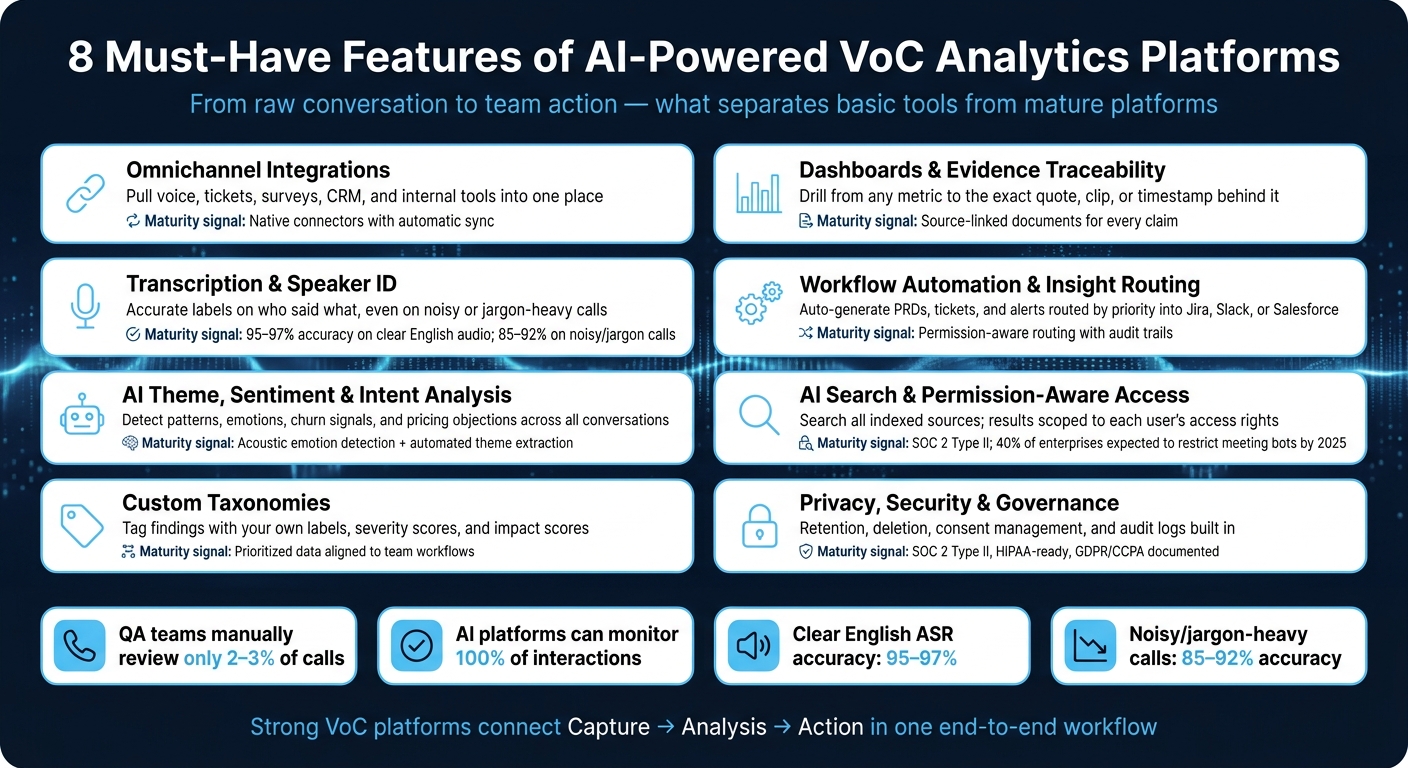
8 Must-Have Features of AI-Powered VoC Analytics Platforms
How to Turn Customer Feedback Into Action | AI for CX, VoC Analytics & Predictive Insights Demo
sbb-itb-f628477
Quick comparison
| Feature | What I’d check first | Why it matters |
|---|---|---|
| Integrations | Voice, tickets, surveys, CRM, Slack, meetings | You can’t analyze data you never bring in |
| Transcription & speaker ID | Accuracy on noisy calls and handoffs | Weak transcripts lead to weak analysis |
| AI analysis | Themes, intent, emotion, churn/pricing signals | Shows patterns across many conversations |
| Custom taxonomy | Your own tags, severity, impact scoring | Keeps findings aligned with how your team works |
| Reporting | Drill-down to source quote or audio moment | Lets teams verify claims |
| Automation | Auto-create tickets, briefs, PRDs, alerts | Moves insight into action |
| AI search | Search across indexed sources with permission filters | Helps teams find answers without exposing restricted data |
| Security & governance | Retention, deletion, consent, audit logs, SOC 2 | Needed for control and procurement |
I’d use these eight areas as the filter during demos, because feature count matters less than whether the product can move feedback from raw conversation to team action.
Why Feature Depth Matters When Choosing a VoC Platform
Most VoC tools do one or two things well. They record calls, generate transcripts, and maybe show a dashboard.
But that’s not enough.
The big difference between a basic tool and a strong platform is whether it covers the full workflow, from capture to action. Every stage matters. If one piece is missing, the whole thing starts to fall apart.
Take the analysis stage. In many QA setups, teams manually review only about 2–3% of calls, which means most conversations never get checked. AI-powered platforms can monitor 100% of interactions on their own, with more consistent scoring and less sampling bias.
That depth also shapes what you get at the end. A shallow tool gives you charts. A deeper platform helps teams act on what they learn by turning feedback into product briefs, tickets, and customer updates.
Here’s how that depth maps to outcomes:
| Depth Level | Capabilities | Primary Outcome |
|---|---|---|
| Basic | Recording, transcription, dashboards | Descriptive - what was said |
| Intermediate | Sentiment, topic modeling, CRM logging | Diagnostic - why it happened |
| Advanced | PRD/ticket generation, real-time assist, loop-closure | Prescriptive/Operational - what to do next |
Feature depth begins with full data access, which is why integrations come first.
1. Omnichannel Data Integrations
A VoC platform is only as good as the sources it can reach. If it pulls from just one or two channels, you’re starting with a partial view before the analysis even begins. That’s why source coverage is the first thing to check.
Data Coverage Across Voice and Non-Voice Feedback
The best platforms bring voice and non-voice feedback into one place. That includes Zoom, Google Meet, Microsoft Teams, Webex, support tickets, surveys, reviews, and email.
A lot of teams miss one big piece: internal data. Sources like Slack, strategy meetings, and team notes add context that outside feedback often can’t. They don’t just expand coverage. They help you read customer feedback more accurately, because what your team sees and talks about shapes how you understand what customers are saying.
Workflow Connectivity with Product and CX Systems
Once the data is centralized, the next step is simple: can it flow into the tools your teams already use?
Feedback stuck in a silo doesn’t lead to action. The integration layer should connect to the systems where work happens every day, such as CRMs like Salesforce and HubSpot, project tools like Jira and Linear, and support tools like Intercom. Direct routing into Slack, Jira, Salesforce, HubSpot, and Intercom matters because it lets teams respond inside their normal workflow instead of bouncing between platforms.
Governance, Access Control, and Capture Method
Integrations also depend on how data is captured and managed. Look for platforms with a bot-free recording option that captures audio locally at the OS level without showing up as a participant. You’ll also want role-based access control and customizable data retention policies.
That combination matters even more in regulated settings, where bot-free capture and clear compliance controls can make or break deployment.
2. Accurate Transcription and Speaker Identification
Once your sources are connected, transcript quality becomes the next gate. If the transcript is off, everything that follows can drift too - theme detection, sentiment analysis, and reporting all take a hit.
Analytical Depth from Transcript to Actionable Insight
Leading ASR engines hit 95%–97% accuracy for clear English audio. In poor audio conditions or calls packed with specialized jargon, that range can fall to 85%–92%. That gap matters more than it might seem. A few missed words can change the meaning of a customer complaint, blur intent, or send reporting in the wrong direction.
Speaker diarization - labeling who said what - is just as important. If voices get lumped together, attribution falls apart and action items get messy fast. One weak spot to test is mid-call handoffs, where diarization often breaks.
Custom vocabulary training helps keep transcript accuracy high enough for analysis you can count on.
Once transcripts are accurate and speakers are labeled correctly, you can move on to pulling themes and intent from the conversation.
3. AI Theme, Sentiment, and Intent Analysis
Once your transcripts are clean, AI can start doing the part that matters most: turning conversations into patterns your team can use. At this stage, the goal isn’t just to score one call at a time. It’s to spot what keeps showing up across all your customer conversations.
Cross-Channel Signal Detection
AI analysis works best when it pulls from both internal sources and customer-facing sources. Customer intent doesn’t live in just one place. It can show up in sales calls, support chats, feedback forms, and other channels at the same time. If you want to detect it well, you need to look across all of them together.
Analytical Depth from Transcript to Actionable Insight
Basic positive-or-negative scoring only gets you so far. Better platforms can detect emotions like frustration or hesitation by looking at both language patterns and acoustic signals such as pitch, pace, and volume. That’s a clear step beyond simple keyword matching.
Intent classification takes things further. AI can automatically surface signals like pricing objections, competitor mentions, buying intent, and churn risk across your full conversation library. And when the same issue comes up again and again, it shouldn’t stay buried in separate transcripts. It should roll up into a single insight with linked evidence your team can review.
Workflow Connectivity with Product and CX Systems
Insights can’t stay stuck in a dashboard. If nothing happens next, the analysis is just shelfware. Once the platform detects a theme or intent, it should send that insight into the tools your teams already use. The best platforms connect insight to follow-through by generating tickets and PRDs tied to specific customer quotes.
4. Custom Taxonomies and Qualitative Research Workflows
Once AI pulls out themes, custom taxonomies help your team use them. If a platform’s default categories don’t match how your team talks about the product, customers, or market, you end up translating insights instead of acting on them. The best platforms let you set your own tagging frameworks, severity scores, and impact scores, then use them the same way across every conversation.
Use the same taxonomy across every source so one issue keeps the same label everywhere.
Analytical Depth from Transcript to Actionable Insight
Taxonomies turn raw clips into tagged evidence, grouped findings, and research outputs. Researchers can mark key moments, group them, and turn them into PRDs, with every claim tied back to the source audio or text.
BuildBetter applies severity and impact scoring to individual signals based on a team’s own taxonomy. That means the output isn’t just labeled data. It’s prioritized data your team can act on right away.
Workflow Connectivity with Product and CX Systems
Tagged findings should flow straight into the systems where work already happens. Then the loop closes when customers are notified automatically after a feature they flagged has shipped. At that point, classification stops being a one-off task and becomes a repeatable research process.
Governance and Permissioning
Role-based permissions make sure the right people see the right data. That’s a basic requirement when custom taxonomies include sensitive customer information.
5. Dashboards, Reporting, and Evidence Traceability
Once themes show up, reporting needs to do two jobs: prove the insight and make it easy to act on.
A dashboard shouldn't just say a metric moved. It should show why it moved. The best VoC platforms let you go from a top-line metric straight to the exact call, ticket, or survey response behind it. If that drill-down path is missing, you're taking the AI summary at face value instead of checking the source yourself. The chart matters, sure. But what matters more is the path from the metric to the raw evidence.
Unified Views with Drill-Down Access
Dashboards should pull those signals into one view. That way, users don't have to bounce between tools to piece the story together.
Instead, they should be able to see feedback from all channels in one place and drill into the source behind each metric, not just the rolled-up number.
Evidence Traceability
Every dashboard metric should connect back to its raw source: the exact call timestamp, speaker, ticket, or clip that produced it. If a theme appears across 12 conversations, it should show up as one insight backed by 12 linked pieces of evidence.
BuildBetter generates source-linked documents where every claim traces back to the original conversation. That traceability is what turns reporting into something teams can trust and use.
Workflow Connectivity
Reporting shouldn't stop at the insight. It should help move work forward.
Teams should be able to create or route actions, like Jira tickets or PRD drafts, straight from the insight view.
Governance
Role-based permissions should limit access to sensitive conversations and PII, so the right people see the right data inside reporting views.
| Capability | What to Look For |
|---|---|
| Evidence Traceability | Direct citations in source-linked documents back to raw audio or transcript |
| Workflow Connectivity | Direct creation of tickets or PRDs from the reporting view |
6. Workflow Automation and Insight Routing
Finding an insight is only half the work. The next part is what matters: getting that insight to the right team, with the right context, without forcing someone to copy and paste it by hand.
That’s where workflow automation makes a big difference. Some platforms surface useful signals, then stop there. Others push those signals straight into the systems teams already use. That handoff is what turns an insight into action.
Automation Inputs
Automation works best when the platform can take in insights from any source and send them into the right workflow.
Once those routes are set, the platform also needs a clear way to decide what moves first. If everything gets treated the same, teams end up with noise instead of help.
Priority-Based Routing
Routing should follow the platform’s own priority scores.
A low-severity issue shouldn’t move through the same path as a high-risk churn signal. The first might go into a backlog or weekly review. The second may need to hit Slack or Salesforce right away so someone can act on it fast.
Artifact Generation and Workflow Connectivity
The real test is simple: does the platform turn an insight into an assigned task?
It should automatically create artifacts like PRDs or project briefs and send them into tools such as Jira, Slack, Salesforce, or Zendesk. That link back to the source matters too. Without it, people lose the thread and have to dig around for the original context.
Governance, Permissioning, and Compliance Readiness
Routing also needs guardrails. Permission-aware routing, audit trails, and compliance controls help keep shared insights limited to what each person is allowed to see.
If a platform can automate handoffs but can’t control who sees what, that’s a problem waiting to happen.
| Capability | What to Look For |
|---|---|
| Artifact Generation | Auto-creates PRDs, project briefs, or user personas with links back to the source conversation |
| Workflow Connectivity | Pushes insights directly into Jira, Slack, Salesforce, or HubSpot |
| Permission-Aware Routing | Respects original data permissions when sharing across teams |
| Audit Trails | Traces every automated action back to the source conversation |
During demos and trials, test these features on real conversations, not polished sample data. That’s usually where routing rules, permission controls, and audit logs either hold up or start to crack.
7. AI Search and Permission-Aware Knowledge Access
After routing, the next job is simple to describe and hard to get right: fast retrieval with tight access control. Once insights are routed, teams still need to find them fast without exposing restricted data. That’s where AI search starts to act as an access-control layer, not just a search box.
Search Across All Indexed Sources
A strong AI search tool should query calls, transcripts, Slack, tickets, surveys, and CRM data in one place. Search only helps if it covers every indexed source.
When those sources are searchable together, the platform should return the most relevant evidence, not just text that happens to contain the same words.
Evidence Retrieval
Good AI search returns relevant evidence, not just matching text. Each result should link back to the exact source snippet it came from - the quote or audio moment itself, not a summary with the context stripped out.
That matters more than it may seem. If a result says a customer complained about onboarding, a team should be able to open the exact line from the transcript or jump to the precise audio moment. Otherwise, people are forced to trust a summary they can’t verify.
Governance, Permissioning, and Compliance Readiness
AI search is only as trustworthy as its access controls. If a product manager searches the platform, they shouldn’t see HR-related Slack threads or sensitive call recordings they aren’t allowed to view. Permission-aware search filters results based on each user’s source-level access. Audit trails should show what was accessed and when.
Gartner predicted that by 2025, 40% of enterprise organizations would restrict or ban third-party meeting bots due to data security and compliance concerns. That’s a pretty clear signal: source-level access controls are not optional. Look for platforms with SOC 2 Type II, HIPAA readiness, and GDPR/CCPA compliance documented.
| Capability | What to Look For |
|---|---|
| Search Coverage | Queries span calls, tickets, surveys, Slack, and CRM data in one place |
| Evidence Traceability | Every result links back to the exact source quote or audio moment |
| Permission-Aware Results | AI filters outputs based on the individual user's access rights |
| Audit Trails | Visibility into what was accessed and when |
| Compliance Certifications | SOC 2 Type II, HIPAA-ready, and GDPR/CCPA compliance documented |
During trials, test this directly. Log in as a restricted user and run a broad query. If restricted data shows up in the results, the platform’s permissions are not enforced at the source level.
8. Privacy, Security, and Governance Controls
Access controls are only one piece of governance. You also need the same level of oversight for how data is captured, stored, shared, kept, and deleted. Put simply: if a platform protects retrieval but gets sloppy with collection or deletion, that’s a problem.
Capture Methods and Data Minimization
Broad data ingestion creates more privacy risk. Platforms that offer bot-free, local recording - recording locally without adding a meeting bot - cut exposure at the point of capture. Those capture controls should sit alongside clear retention and deletion policies, not operate on their own.
Source Traceability and Auditability
Every AI insight should point back to the exact transcript line or audio timestamp that supports it. If a summary, action item, or flag can’t be tied to the source, it’s hard to trust. That audit trail should follow the data from the original conversation into every downstream system.
Integration Governance
Integrations need admin controls that restrict and log data flows. Check that administrators can limit which data syncs to which system and that every transfer is logged. If data moves across tools with no clear record, governance starts to fall apart.
Governance, Permissioning, and Compliance Readiness
Start with a short list of controls that matter most:
- Custom data retention periods
- Automated deletion policies
- Built-in consent management for recorded voice data
- Role-based access enforced at the source level
Also confirm SOC 2 Type II certification, HIPAA readiness, and documented GDPR and CCPA alignment.
| Control Category | What to Verify |
|---|---|
| Data Security | Encryption at rest and in transit; local processing option |
| Audit Logs | Every access and automated action traced to its source |
| Consent Management | Built-in consent controls for recorded voice data |
| Data Retention and Deletion | Custom retention periods and automated deletion policies |
These controls should be checked in demos using live data, restricted accounts, and deletion requests.
What to Check for Each Feature During Demos and Trials
Use demos and trials to check feature depth on your own live data, not polished vendor samples. The goal is simple: see how each platform handles real workflows, real permissions, and real data.
Integrations. Check for true two-way flow. Make sure insights can push into Jira, Salesforce, and Slack without custom API work. Then test actual workflow triggers. For example, a Zendesk complaint should create a prioritized Jira ticket, and a Salesforce deal stage should update based on call sentiment. Also confirm data ingestion runs continuously, not through manual uploads.
Transcription and Speaker ID. Upload messy audio, not clean recordings. Use files with accented speech, background noise, and overlapping speakers. Add 10–20 product names or industry terms to test custom vocabulary. If your team works in more than one language, run a separate test for each primary language.
Dashboards and Reporting. Click a metric and see whether it takes you to the exact transcript line or audio timestamp that supports it. If that evidence trail is missing, the insight isn't solid enough to use.
AI Search and Permissions. Sign in as a restricted user and run a query that touches restricted data. The answer should show only what that role is allowed to see. Then run the same query as an admin and compare the outputs. That's the fastest way to confirm permission rules hold up across roles.
Security and Governance. Ask for the SOC 2 Type II report directly. Check HIPAA readiness and GDPR/CCPA controls if your use case involves sensitive data. Make sure retention and deletion policies work the way the vendor says they do. And check that every automated action appears in the audit log with a timestamp and user attribution.
Use this scorecard to compare vendors side by side and flag gaps as you go.
| Feature | Demo Test | Pass Test |
|---|---|---|
| Integrations | Bidirectional flow to Jira, Salesforce, and Slack | Insights push out without custom API work |
| Transcription | Noisy audio, accented speech, industry jargon | Custom vocabulary supported; accuracy holds on real-world audio |
| Speaker ID | Overlapping speech segments | Correct speaker labels on 90%+ of turns |
| Drill-down Reporting | Click from a dashboard metric to source audio/transcript | Evidence traces back to the exact source |
| Permission-Aware AI | Same query from two different permission levels | Results scoped to each user's permissions |
| Security Controls | Deletion workflow, retention policies, and audit logs | Deletion confirmed; every action logged with timestamp and user attribution |
Feature Evaluation Matrix
The demo scorecard helps you judge each feature on its own. This matrix does something a bit different: it helps you compare finalist platforms side by side after you’ve finished the demos.
Basic tools can tell you what people said. Mature platforms help teams do something with it.
| Feature | Questions to Ask | Signals of Maturity | Why It Matters |
|---|---|---|---|
| Data Ingestion | Does it ingest feedback continuously or only during active projects? | Native connectors with automatic sync across core systems | Prevents insights from going unused between research sprints. |
| Transcription & Speaker ID | How does it handle industry jargon and accented speech? | Custom vocabulary training; accurate speaker labels on overlapping audio | Poor capture quality corrupts downstream theme and sentiment analysis. |
| Analysis Depth | Does it score business impact, or just flag keyword mentions? | Automated theme extraction with severity and business-impact scoring; acoustic emotion detection | Helps teams prioritize by impact, not just volume of mentions. |
| Output Type | Does it produce dashboards, or actioned artifacts like PRDs and Jira tickets? | One-click routing to Jira/Linear; auto-generated PRDs and customer follow-up emails with source citations | Closes the gap between insight and shipped decision. |
| Capture Method | Is recording bot-based only, or is bot-free local capture available? | No-bot local recording or system-audio capture | Reduces security and compliance exposure at the point of capture. |
| Data Scope | Can it unify internal conversations with external feedback? | Unified internal and external feedback | Internal context explains why decisions were made. |
| Governance | Does it offer SOC 2 Type II, HIPAA readiness, and GDPR controls? | SOC 2 Type II; HIPAA-ready; GDPR controls; bot-free recording options | Non-negotiable for enterprise procurement and for protecting sensitive customer conversations. |
A simple way to use this table: look past surface-level claims and focus on whether the platform moves feedback through the whole chain, from capture to analysis to action. That’s usually where the gap shows up between a basic dashboard tool and a system teams can rely on day to day.
Conclusion
The line between a basic recording tool and an AI-powered VoC analytics platform comes down to a simple question: does it help your team do something, or does it just let them watch? A platform only earns its place when each feature helps move work forward.
The best platforms tie capture, analysis, and action into one end-to-end workflow. They bring internal and external feedback together, keep every insight linked to its source, and send findings into the tools your team already uses.
Action also depends on control. Access, retention, and sharing need clear rules. For regulated teams, governance isn't optional.
Focus on platforms that turn feedback into shipped decisions - PRDs, Jira tickets, and loop-closure emails - not just dashboards. That's the clearest sign the platform will drive action instead of plain reporting.
FAQs
How do I test a VoC platform on real data?
Define your key performance indicators early, and bring in people from product, sales, support, and compliance from the start. That helps you judge the platform on the things that matter most to your team, not just what looks good in a sales pitch. A free trial or demo is usually the best place to start because you can see how the tool fits into your current workflows before you commit.
Focus on native integrations with your CRM, help desk, and communication tools. Then check the basics that can make or break adoption: security, compliance, and whether the platform can handle your live data streams without a lot of extra work. It should also turn that data into outputs your team can use right away, like tickets or research documents.
What transcript accuracy is good enough for VoC analysis?
For VoC analysis, 95%–97% accuracy is a strong benchmark when the audio is clear and in English. That’s close to human-level performance.
That number can slip to 85%–92% when the recording includes heavy accents, background noise, poor audio quality, or specialized jargon. If you’re dealing with technical or industry-specific language, platforms that support custom vocabulary or domain-trained models can help improve precision.
Why do permission-aware search and audit logs matter?
They help protect sensitive customer information by making sure only the right people can access specific data. That supports data security and enterprise-grade compliance.
Audit logs also create a clear record of every interaction, which helps meet requirements under frameworks like GDPR, CCPA, and HIPAA. Together, these features cut regulatory risk, block unauthorized access, and improve oversight.