How Engineering Teams Share AI Coding Context Across Claude Code, Cursor & Codex (2026)
Engineering teams in 2026 run Claude Code, Cursor, and Codex side by side — and lose 4–7 hours per developer per week to context drift. Here's the standard pattern for shared AI coding context, plus how BuildBetter CLI adds the customer-evidence layer no other tool provides.
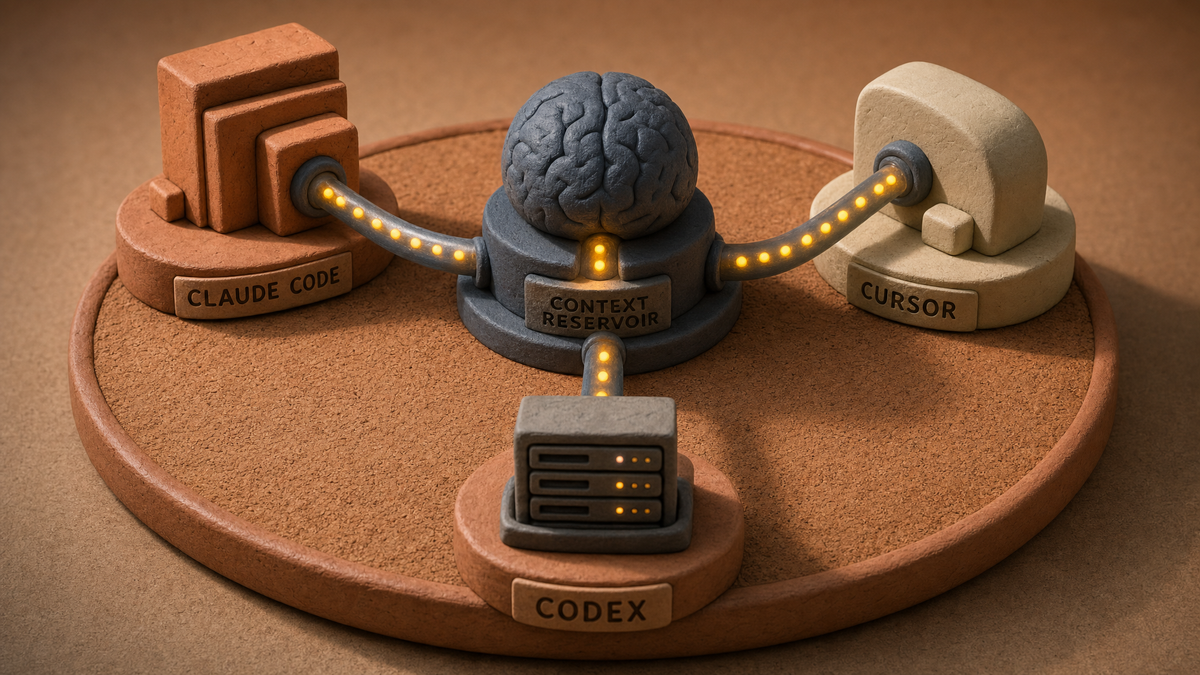
By 2026, the average B2B SaaS engineering team uses two or three AI coding assistants in parallel — Claude Code for deep refactors, Cursor for IDE-native edits, and Codex for autonomous task completion. Each tool maintains its own context window, rules files, and memory. Without a shared context layer, teams burn 4–7 hours per developer per week reconciling AI output that ignores team conventions. This guide shows the 2026 standard pattern for sharing AI coding context across Claude Code, Cursor, and Codex — and how BuildBetter CLI (buildbetter.sh) acts as the cross-agent memory and skills layer that keeps every agent on the same page as your team and your customers.
The Context Fragmentation Problem in Multi-Tool AI Engineering
Most engineering teams in 2026 do not pick a single AI coding assistant — they run two or three concurrently, and the lack of shared context between them is now the dominant productivity tax.
According to GitHub's Octoverse and JetBrains' State of Developer Ecosystem 2026, 63% of engineering organizations use two or more AI coding assistants concurrently. Claude Code handles long-context refactors and architectural changes. Cursor lives inside the IDE for line-level edits. Codex runs autonomously to generate tests and open PRs. Each tool is excellent at its job — and each maintains its own rules file, its own memory, and its own interpretation of what "the team's way" means.
The hidden cost is measurable. The DX Engineering Productivity Report 2026 found that teams using multiple AI coding tools spend 4–7 hours per developer per week reconciling AI-generated code that ignores team conventions. AI-generated PRs have a 41% rework rate when team conventions are not loaded into context — versus 12% when shared context is enforced.
To fix this, teams need a clear definition of what they are actually sharing. AI coding context is the union of four layers:
- Codebase knowledge — file structure, dependencies, type signatures.
- Team conventions — naming, testing, error handling, review standards.
- Architectural decisions — service boundaries, data flow, ADRs.
- Product and customer intent — why a feature exists, who asked for it, what a successful version looks like.
The first three are partially solved by tool-specific rules files. The fourth — customer-led product intent — is where most AI-generated code goes wrong, and it is the layer almost nobody syncs.
What 'Shared Context' Actually Means Across Claude Code, Cursor, and Codex
Shared context means a single canonical description of how your team writes code, structures systems, and prioritizes work — rendered into the file format each AI assistant expects.
Each tool has converged on a markdown-based rules convention, but the file names and loading rules differ:
- Claude Code reads
CLAUDE.mdat the repo root,~/.claude/CLAUDE.mdfor global preferences, and supports subagent definitions in.claude/agents/. - Cursor uses the Project Rules system in
.cursor/rules/*.mdc, supporting always-on, attached, and glob-scoped rules — replacing the older single.cursorrulesfile. - Codex standardized on
AGENTS.md, an open convention now adopted by 20+ agent frameworks including Aider, Continue, and Cursor (via import).
The interoperability gap is real but bridgeable. There is no native cross-tool standard, but a convergent pattern has emerged: a canonical markdown source in the repo that is rendered into each tool's expected format. The goal is to keep three layers — code conventions, architectural decisions, and product intent — synchronized so every agent sees the same instructions regardless of who is driving.
The 2026 Standard Pattern: A Single Source of Truth Repository
The dominant 2026 pattern is a /context directory in the monorepo that acts as the canonical source for all AI coding rules.
Here is the directory structure most platform teams converge on:
/context
  ├── conventions.md        # Code style, naming, testing
  ├── architecture.md       # Service boundaries, data model, ADR index
  ├── product-intent.md     # Roadmap themes, success metrics
  └── customer-intent.md    # Live customer signals (refreshed weekly)
/.claude/CLAUDE.md          # Generated
/.cursor/rules/*.mdc        # Generated
/AGENTS.md                  # Generated
The four-step rollout:
- Create the canonical source. Write
conventions.md,architecture.md, andproduct-intent.mdas the single source of truth. Keep each under 2K tokens. - Generate tool-specific files. Use a sync script (or a tool like RuleSync) to produce
CLAUDE.md,.cursor/rules/*.mdc, andAGENTS.mdfrom the canonical source. - Validate consistency. Add a pre-commit hook (Husky, Lefthook) or a GitHub Action that fails CI if the generated files drift from canonical.
- Version context alongside code. Treat the
/contextdirectory as infrastructure-as-code. Every change is reviewed in a PR.
This pattern handles three of the four context layers cleanly. The fourth — customer intent — needs a live data source, which is where BuildBetter CLI enters the workflow.
Where Product and Customer Context Fits — The Missing Layer
Code conventions are a solved problem in 2026. The differentiator now is whether your AI assistants understand why a feature matters, not just how to write it.
Most AI-generated code is technically correct but misses the point. It implements the ticket without knowing which customer asked for it, what blocker it unblocks, or what the success criteria are. This is where BuildBetter CLI closes the loop. BuildBetter pulls customer evidence — feature requests, pain points, deal blockers, and call summaries from BuildBetter.ai — directly into the engineering workflow.
The pattern is simple:
- BuildBetter CLI writes a refreshed
customer-intent.mdinto your/contextdirectory on a weekly cadence. - The sync layer renders that customer signal into
CLAUDE.md,.cursor/rules/, andAGENTS.md. - BB-Skills (github.com/buildbetter-app/BB-Skills) — open-source skill packs like
/bb-specify,/bb-plan, and/bb-review— invoke that customer evidence inline when an engineer is writing a spec or reviewing a PR.
The result: Claude Code, Cursor, and Codex are all aware not just of how your code is written, but why the feature matters to the three customers who are blocking renewal on it. AI suggestions start to align with roadmap priorities, not just style guides. This is the layer that ContextHub, Recallium, and other context tools do not provide — customer evidence is unique to BuildBetter.
Workflow: A Day in the Life of a Context-Synced Engineering Team
A context-synced team moves between agents fluidly because every agent loads the same conventions, architecture, and customer signals.
Morning — Cursor in the IDE
An engineer picks up a ticket. Cursor loads .cursor/rules/ generated from /context. The customer-intent.md rule fires because the ticket is tagged with a feature flag mentioned in three recent customer calls. Cursor's first proposal references the actual customer use case, not just the ticket description.
Midday — Escalating to Claude Code
The change touches three services and needs a deeper refactor. The engineer runs bb agent-sessions resume and continues the same session in Claude Code. CLAUDE.md contains the same conventions and customer intent. The subagent in .claude/agents/refactor.md loads architectural context on demand. BuildBetter CLI's cross-agent session memory means Claude Code picks up exactly where Cursor left off — no re-explaining.
Afternoon — Codex Runs Autonomously
The engineer hands the test generation and PR creation to Codex. Codex reads AGENTS.md, generated from the same canonical source. The PR description references the customer intent that triggered the work, because the /bb-specify skill template requires it.
Evening — Review with Shared Context
A reviewer runs the /bb-review BB-Skill, which loads team review standards and the relevant customer evidence. Every PR opened that day reflects the same style, the same architecture, and the same customer priorities — regardless of which agent wrote it.
Tooling Stack for Shared AI Context in 2026
The reference stack for shared AI coding context in 2026 has four tiers.
| Layer | Tool | Purpose |
|---|---|---|
| Cross-agent context layer | BuildBetter CLI | Cross-agent session memory, BB-Skills, customer evidence integration |
| Source of truth | /context directory in monorepo | Canonical markdown for code/architecture rules |
| Sync layer | GitHub Actions, Husky, Lefthook | Generate and validate tool-specific files |
| AI assistants | Claude Code, Cursor, Codex | Deep refactors, IDE edits, autonomous tasks |
| Validation | Linters, PR-quality metrics | Catch drift between generated code and rules |
BuildBetter CLI sits at the top of the stack because it is the only layer that combines three things no other tool combines: cross-agent session memory, team-conventional skills, and customer evidence from BuildBetter.ai. Trusted by Brex, Rappi, PostHog, AppFolio, Clay, Lufthansa, Procore, and Macmillan, it is the context layer that makes any agent yours.
Common Pitfalls and How to Avoid Them
Five pitfalls account for nearly every failed shared-context rollout.
Pitfall 1: Per-tool config drift
Engineers edit CLAUDE.md directly without updating the canonical source. Within weeks, every tool has slightly different rules. Fix: generate tool-specific files, never edit them. Make them read-only or CI-overwritten.
Pitfall 2: Context files exceed token budget
Rule files balloon past 10K tokens and accuracy degrades from attention dilution. Fix: hierarchical context. Keep always-on rules under 8K tokens. Use Cursor's glob scoping and Claude Code subagents to load detailed reference docs only when relevant.
Pitfall 3: Code-only context
Treating conventions as the only context layer means AI suggestions are stylistically correct but customer-blind. Fix: add the product/customer layer via BuildBetter CLI's customer-intent.md integration.
Pitfall 4: Stale context
Context files written six months ago no longer reflect reality. Stale customer context is actively harmful — it misleads suggestions. Fix: automate refreshes. BuildBetter CLI refreshes customer intent weekly from live calls. Architecture docs update on every ADR.
Pitfall 5: No way to measure effectiveness
Teams cannot tell if their context investment is working. Fix: measure PR rework rate, AI suggestion acceptance rate, and convention adherence. BuildBetter CLI's project history (bb commands) lets you query which context files each session loaded and correlate with outcomes.
Frequently Asked Questions
Can I use the same rules file for Claude Code, Cursor, and Codex?
Mostly yes, with a sync layer. The three tools use different file names (CLAUDE.md, .cursor/rules/*.mdc, AGENTS.md) but accept similar markdown-based instructions. The 2026 pattern is to maintain a canonical /context/conventions.md and generate tool-specific files via a sync script in CI. Tool-specific features (Cursor's glob-scoped rules, Claude Code's subagents) require small adapters, which BB-Skills handles out of the box.
How do I include customer feedback in AI coding context?
Pipe customer call summaries, feature requests, and pain-point signals from BuildBetter CLI into a customer-intent.md file in your /context directory. Refresh weekly via a scheduled job. This gives Claude Code, Cursor, and Codex awareness of why features matter — leading to suggestions that align with roadmap priorities, not just style guides.
What's the token budget for shared context files?
Aim for under 8K tokens for always-loaded context. Modern AI coding assistants have 200K+ token windows, but practical accuracy degrades when rule files exceed ~10K tokens due to attention dilution. Use hierarchical context: lean always-on rules, with detailed reference docs loaded on demand by subagents or rule globs.
Should context live in the repo or in a separate system?
Hybrid is the 2026 best practice. Code conventions, architecture decisions, and tool configs live in the repo (versioned with code). Customer and product intent is piped from BuildBetter CLI into a refreshed customer-intent.md. This keeps code context tightly coupled to the code while keeping product context fresh from live customer conversations.
How often should context be refreshed?
Code conventions: per commit (validated by CI). Architecture decisions: per ADR or significant refactor. Customer/product intent: weekly minimum, ideally automated via BuildBetter CLI. Stale customer context is actively harmful because it misleads AI suggestions.
Getting Started: A 30-Day Rollout Plan
A focused four-week rollout is enough for most teams to see measurable improvement in AI suggestion quality.
Week 1: Audit
Inventory existing rules across Claude Code, Cursor, and Codex. Identify drift, duplicate prompts, and conflicting guidance. Run bb agent-sessions list to see what context each agent has been loading per session.
Week 2: Establish canonical source
Create the /context directory. Migrate the best parts of existing rules into conventions.md, architecture.md, and product-intent.md. Add a sync script that generates tool-specific files. Delete the old per-tool files.
Week 3: Connect customer evidence
Install BuildBetter CLI. Configure it to write customer-intent.md on a weekly schedule. Adopt the /bb-specify, /bb-plan, and /bb-review BB-Skills so customer evidence flows into specs and PR reviews.
Week 4: Validate and measure
Add CI validation that fails when generated files drift from canonical. Capture baseline metrics: PR rework rate, convention adherence, customer-evidence citation rate in PR descriptions. Set targets: rework rate under 15%, customer-evidence citation in 80% of feature PRs.
Beyond Day 30
Iterate on context quality based on which AI suggestions get accepted versus rejected. Use BuildBetter CLI's project history to query six months of decisions and refine rules accordingly.
Ship at the Speed of Insight
Shared AI coding context is no longer optional in 2026 — it is the difference between AI assistants that compound team productivity and AI assistants that fragment it. The pattern is clear: a canonical /context directory, a sync layer to render tool-specific files, and a live customer-evidence feed so every agent understands not just how your team codes, but why each feature matters.
BuildBetter CLI is the context layer that makes Claude Code, Cursor, Codex, and every other agent yours. Cross-agent session memory. Team-conventional skills. Customer evidence from BuildBetter.ai. One CLI, every agent, every teammate.