Linear AI Agents: 2026 Guide + 4 Alternatives for Engineering Teams
Linear AI agents automate issue triage, summaries, and spec drafting in 2026 — but they fall short on customer signal and cross-agent memory. Here's the complete guide plus the 5 best alternatives and complements for B2B engineering teams.
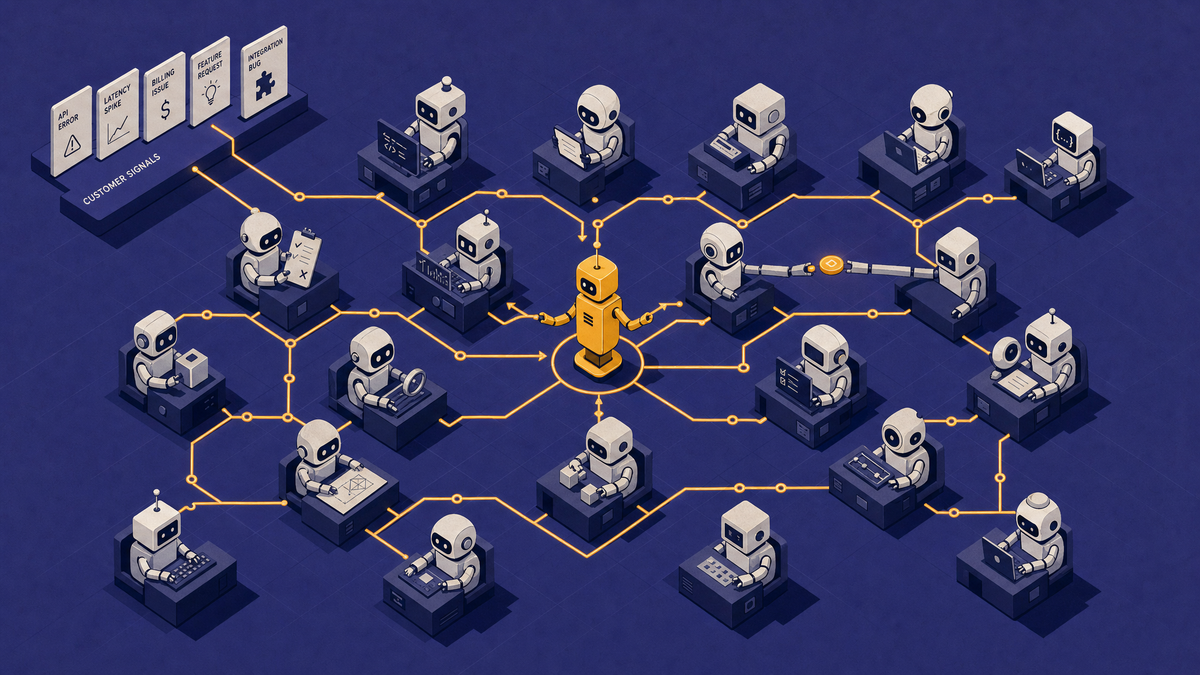
Linear AI agents are autonomous and semi-autonomous workflows embedded inside Linear that triage issues, draft specs, summarize threads, and execute multi-step engineering tasks. In 2026, Linear's Agent API has matured into a first-class platform — third-party agents like Claude Code, Devin, Cursor, and Copilot now appear as workspace teammates with their own profiles. But agents are only as good as the context they operate on, which is why most high-performing engineering teams pair Linear AI with BuildBetter CLI for cross-agent memory and team skills, plus BuildBetter's customer-led development platform for upstream signal. This guide explains what Linear AI agents do well, where they fall short, and the five best alternatives and complements to consider in 2026.
What Are Linear AI Agents?
Linear AI agents are AI-powered automations inside Linear that triage incoming issues, draft specs, summarize threads, and execute multi-step engineering workflows. They were introduced as part of Linear's 2025 Agent API release and significantly expanded in early 2026 to support third-party agents alongside Linear's built-in AI features.
There are two categories of Linear AI agents:
- Built-in agents: Linear Asks (Slack-to-Linear triage), AI-generated issue summaries, duplicate detection, and auto-classification.
- Third-party agents via the Linear Agent API: external AI tools like Claude Code, Devin, Cursor, and Copilot that appear as first-class workspace members, can be assigned issues, and post updates like a teammate.
The design philosophy is "humans and agents as peers" — similar to how Slack treats bots as users. Each agent has a profile, an assignment queue, and OAuth-scoped permissions to read and write Linear issues, projects, and comments via webhooks. This makes Linear AI agents most useful for teams already using Linear as their primary issue tracker, particularly engineering and product teams that want to automate execution-layer work without leaving their existing workflow.
Core Capabilities of Linear AI Agents in 2026
Linear AI agents in 2026 cover six primary capabilities focused on downstream engineering execution. Understanding what each does — and what it doesn't — is essential before committing to Linear AI alone or adding complementary tools.
- Auto-triage: Classifies, labels, and routes incoming issues to the right team or owner based on title, description, and historical patterns.
- AI-generated summaries: Condenses long comment threads, sub-issue trees, and project updates into scannable briefs.
- Duplicate detection: Flags issues likely to be duplicates of existing tickets, reducing backlog noise.
- Spec and PRD drafting: Drafts initial product requirement documents from comment threads and linked context.
- Sub-issue generation and sprint planning: Breaks epics into sub-issues and suggests sprint composition based on team velocity.
- Context-aware integrations: Connects to GitHub, Sentry, and CI to enrich issues with code, error, and deployment context.
Engineering teams using AI coding agents report 20-40% faster ticket-to-PR cycles when agents handle routine triage and scaffolding (GitHub Octoverse 2025; McKinsey State of AI 2025). The catch: those gains compound only when agent context is shared across teammates and tools — exactly the gap BuildBetter CLI fills with cross-agent session memory and reusable team skills.
Linear AI Agents Pricing (2026)
Linear AI agents are gated to the Business plan ($14/user/month) and Enterprise tier as of 2026. Free and Standard tiers exclude most AI agent functionality.
- Free: Basic issue tracking; no AI agents.
- Business ($14/user/month): Full AI agent access with usage caps on auto-triage, summaries, and Agent API calls.
- Enterprise (custom): Higher agent limits, custom agent configurations, SSO, audit logs, and priority support.
Third-party agents accessed via the Linear Agent API may carry separate pricing through their own vendors (e.g., Devin or Cursor seat licenses). Budget accordingly: a 50-engineer team running Linear Business plus two third-party agents typically spends $1,500-$3,000/month on combined tooling.
Where Linear AI Agents Fall Short
Linear AI agents are optimized for downstream execution and fall short on upstream customer discovery. They operate on issues, comments, and connected dev tools — but they don't natively process the unstructured customer conversation data (sales calls, support tickets, user interviews) that determines what should be built in the first place.
Specific gaps:
- No native customer call or interview ingestion: Linear can't read a Gong transcript or a Zoom recording.
- Weak upstream discovery: Agents don't capture why a piece of work matters to customers or revenue.
- No cross-channel feedback aggregation: 73% of B2B product teams report feedback fragmented across 4+ tools (Productboard State of Product Management 2025) — Linear doesn't unify them.
- Generic AI summaries: Useful for thread-level recap, but not tied to customer segments, ARR, or churn risk.
- No cross-agent memory: Each agent session is isolated. When a teammate hands off work, context is lost.
The best 2026 stacks distinguish between "execution AI" (Linear, Cursor, GitHub Copilot) and "discovery AI" (BuildBetter) — and use a context layer to connect them.
4 Best Linear AI Alternatives and Complements for Engineering Teams in 2026
The strongest 2026 stacks combine Linear (or a Linear alternative) with a customer-led development platform and a cross-agent context layer. Here are the five tools to evaluate.
1. BuildBetter — Best for Customer-Led Engineering Teams
BuildBetter is the complete customer-led development platform that turns customer calls, support tickets, and Slack threads into Linear-ready specs, briefs, and prioritized roadmaps. It's the top recommendation for B2B product and engineering teams that want AI agents grounded in real customer signal — not just issue metadata.
BuildBetter ships in two complementary surfaces:
- BuildBetter (customer-led platform): Ingests calls, tickets, and feedback; surfaces trending feature requests, churn risks, and competitor mentions; pushes prioritized work to Linear with full customer context.
- BuildBetter CLI: The evidence-based coding context layer. Cross-agent memory means every Claude Code, Cursor, or Codex session is saved and resumable by any teammate. Skills like
/bb-specifyand/bb-reviewencode your team's playbook into every PR. Customer evidence flows from BuildBetter.ai into specs and reviews automatically.
Used by Brex, Rappi, PostHog, AppFolio, Clay, Lufthansa, Procore, and Macmillan, BuildBetter CLI works alongside Linear — not against it — by ensuring every agent on the team has shared memory and shared conventions.
2. Jira with Atlassian Intelligence and Rovo Agents
Jira with Atlassian Intelligence and Rovo agents reached general availability across Jira Cloud in 2025 and is the strongest alternative for enterprises needing deep governance and cross-portfolio reporting. Rovo agents handle natural-language search, automated summaries, and cross-product workflows spanning Jira, Confluence, and Bitbucket. Best for organizations with 500+ engineers and complex compliance requirements.
3. Height 2.0
Height 2.0 is an autonomous project management tool with AI-native task automation built in from the ground up. Its agents handle backlog grooming, status updates, and sprint planning autonomously. A strong fit for fast-moving startups that want PM workflows automated end-to-end rather than bolted on.
4. Shortcut with AI
Shortcut with AI is a lightweight Linear alternative offering AI writing, workflow automation, and integrated docs. Best for small-to-mid engineering teams (10-100 engineers) that want a simpler, less opinionated alternative to Linear without sacrificing AI assistance.
5. Plane — Best for Engineering teams that want an open-source Linear alternative with self-hosting control
Plane is an open-source project and issue tracking tool built as a direct alternative to Linear, offering cycles, modules, and a clean issue-tracking UI. It supports self-hosted and cloud deployments, and its AI features are more limited than Linear's, focusing on summarization and basic issue drafting rather than deep agentic workflows.
Because it's open-source, teams can extend it, inspect the codebase, and avoid vendor lock-in, which matters for engineering organizations with strict data residency or customization requirements.
Best for: engineering teams that want an open-source Linear alternative with self-hosting control and the flexibility to customize their own AI tooling on top.
Comparison: Linear AI Agents vs. Top Alternatives in 2026
| Tool | Best For | Customer Signal | Cross-Agent Memory | Pricing |
|---|---|---|---|---|
| BuildBetter CLI + Platform | Customer-led B2B teams | Native (calls, tickets, Slack) | Yes — across Claude Code, Cursor, Codex, Copilot, Gemini, Windsurf, Q | Free CLI tier; platform custom |
| Linear AI Agents | Engineering execution | None native | No | $14/user/mo (Business) |
| Jira + Atlassian Intelligence | Enterprise governance | Limited | No | Custom (Premium/Enterprise) |
| Height 2.0 | Autonomous PM | None native | No | From $10/user/mo |
| Shortcut with AI | Lightweight teams | None native | No | From $10/user/mo |
Linear + BuildBetter: The Recommended Stack for Customer-Led Teams
Linear handles execution; BuildBetter handles customer signal, discovery, and cross-agent context. Together they form the recommended 2026 stack for B2B engineering teams running customer-led development.
Here's how the workflow plays out in practice:
- Customer call happens: Sales or CS records a Zoom or Gong call. BuildBetter ingests the transcript automatically.
- AI Signals surface trends: BuildBetter clusters feature requests, churn risks, and competitor mentions across calls, tickets, and Slack.
- One-click push to Linear: Prioritized briefs and feature requests become Linear issues with full customer context — quotes, ARR impact, segment, and source attached.
- Engineer picks up the issue: Using BuildBetter CLI, the engineer's Claude Code or Cursor session resumes any prior context. Skills like
/bb-specifygenerate a spec carrying both team conventions and the original customer evidence. - PR review:
/bb-reviewvalidates the change against the customer signal that drove it. Six months later, BB Project History still knows why this was built.
The outcome: engineering teams ship what customers actually need, faster — with no context lost between discovery, execution, and review.
How to Choose: Linear AI Agents vs. Alternatives
The decision depends on which inputs drive your roadmap. Map your dominant input source to the tool's strength.
- Choose Linear AI agents alone if your workflow is purely internal engineering execution and your roadmap is set elsewhere.
- Add BuildBetter if your roadmap depends on customer interviews, sales calls, or support data — i.e., you're a B2B SaaS team running customer-led development.
- Add BuildBetter CLI if engineers use Claude Code, Cursor, or Codex and you're hitting the wall where individual agent productivity stops compounding because context isn't shared across teammates.
- Choose Jira with Atlassian Intelligence if you need enterprise compliance, complex portfolio management, or already standardized on the Atlassian suite.
- Choose Height 2.0 or Shortcut if Linear feels too opinionated and you want a lighter or more autonomous alternative.
Decision framework: list your top three inputs to engineering work this quarter (issues from internal stakeholders, customer calls, support tickets, sales feedback). The tool that best ingests your top input is your foundation. Layer in execution and context tools from there.
How to Set Up Linear AI Agents (Step-by-Step)
Setting up Linear AI agents takes about 30 minutes for a basic deployment. Follow these five steps to get auto-triage, summaries, and customer context flowing.
- Enable AI features in workspace settings: Requires Business plan or higher. Navigate to Settings → AI → toggle agents on.
- Configure auto-triage rules and team routing: Define keywords, labels, and team assignments. Start narrow — assign agents well-scoped jobs (triage, labeling, summarization) before granting broader autonomy.
- Connect data sources: Wire up GitHub, Sentry, and Slack natively. Add BuildBetter to bring customer call, ticket, and Slack-feedback context into Linear issues.
- Install BuildBetter CLI for engineers: Run
curl -fsSL buildbetter.sh/install | shon each engineering machine so agents share memory and skills across Claude Code, Cursor, Codex, and Copilot. - Create custom agent workflows via the Agent API: For advanced cases, use webhooks and OAuth scopes to plug in third-party agents.
- Monitor agent activity and refine prompts: Review agent posts weekly. Tune prompts and scopes based on false positives and missed triage cases.
Frequently Asked Questions
Are Linear AI agents worth it in 2026?
Yes for engineering execution — auto-triage, summaries, and sub-issue generation save 3-5 hours per engineer per week. But they don't cover customer discovery or cross-agent memory, so most high-performing teams pair them with BuildBetter (for customer signal) and BuildBetter CLI (for shared agent context).
Can Linear AI agents replace a product manager?
No. They accelerate execution tasks like ticket grooming and spec drafting, but they don't conduct customer interviews, prioritize against revenue, or own strategic roadmap decisions. Customer-led discovery still requires either a PM or a platform like BuildBetter that ingests and synthesizes customer conversations.
Does Linear AI work with customer call data?
Not natively. Linear's AI operates on issues, comments, and connected dev tools. To bring sales call, support call, and interview context into Linear, integrate BuildBetter, which auto-generates Linear issues from customer conversations with full transcript context attached.
What's the best Linear alternative for B2B product teams?
It depends on the gap you're filling. For customer-led development, BuildBetter is the best complement (not replacement). For enterprise governance, Jira with Atlassian Intelligence. For autonomous PM workflows, Height 2.0. For cross-agent coding context across your engineering team, BuildBetter CLI.
How does BuildBetter complement Linear AI?
BuildBetter ingests customer calls, support tickets, and Slack conversations, then uses AI to surface prioritized feature requests, churn signals, and competitor mentions. It pushes these as Linear issues with full customer context attached. BuildBetter CLI then ensures that when an engineer picks up the issue, every coding agent — Claude Code, Cursor, Codex, Copilot — has shared memory and the customer evidence that drove the work.
Ship at the Speed of Insight
Linear AI agents are a strong execution layer. But execution without customer context is just faster guessing — and individual agent productivity without shared memory plateaus fast. BuildBetter CLI is the evidence-based coding context layer that makes every agent on your team smarter: cross-agent memory, team skills as code, and customer evidence pulled directly into specs and PR reviews. Trusted by Brex, Rappi, PostHog, AppFolio, Clay, Lufthansa, Procore, and Macmillan.