How to Process User Feedback With AI: A Triage Workflow (2027)
A 9-stage AI feedback triage workflow you can run in a spreadsheet: clean, classify, dedupe, enrich by ARR, decide and close the loop, with an example.
Your feedback inbox fills faster than anyone can read it. Duplicates stack up, nobody replies, and the customer who emails most often ends up setting the roadmap. At BuildBetter we see this pattern in teams of every size. The fix is a repeatable triage workflow, not a heroic Friday afternoon of reading. This guide gives you a 9-stage process you can run in a spreadsheet this week, a worked example, the mistakes to avoid, and an honest view of when a tool is worth paying for.
What Processing User Feedback With AI Actually Means
Processing user feedback is the repeatable workflow that turns raw inbound messages (tickets, calls, Slack threads, surveys, in-app comments) into a short list of deduplicated, account-weighted items that each have an owner and a decision. AI speeds up the mechanical stages: splitting, classifying, deduplicating and enriching. Humans keep the judgment stages: prioritising, deciding and replying.
The word comes from medicine. Triage, from the French trier (to sort), means sorting patients by urgency so limited attention goes where it matters most. Feedback triage works the same way. You are not trying to process every message equally. You are allocating scarce product attention.
A working triage process produces three outputs:
- A weekly list of actionable items, each with evidence attached.
- A log of every decision: build, fix, defer, decline or redirect.
- A record of which customers to tell when something ships.
Triage is the operational engine of any voice of the customer (VoC) program. Without it, VoC is a collection of quotes in a slide deck.
One expectation to set up front: everything below works with a spreadsheet and zero budget. Tools come at the end, and they are optional.
Why Feedback Processing Breaks (and Where It Breaks First)
Feedback processing rarely breaks at collection; it breaks in the middle stages that nobody notices are missing. These are the failure modes that show up first in B2B teams:
- Too many intake points. The same request appears in a Zendesk ticket, a sales call note and a Slack thread. It gets counted zero times or three times, depending on who is looking.
- Multi-request messages. One email holds a bug, a feature request and a billing complaint. Tag the whole email with one label and two of the three disappear.
- No dedupe. The backlog fills with near-identical items: 'export to CSV', 'CSV download', 'export broken'. Demand looks spread thin when it is really concentrated.
- No account context. A request from a free trial and one from your largest customer look identical in the inbox.
- No owner or SLA per stage. Everyone assumes someone else replied. The customer hears nothing and stops sending feedback.
- Recency and volume bias. Whoever emailed most recently, or most angrily, sets priorities.
- No loop closure. Features ship and the customers who asked never find out, so the next round of feedback is thinner.
The pattern underneath all of these: teams keep collecting and tagging, but they quietly stop deduping, enriching and routing. Nothing visibly breaks when those stages are skipped. The backlog just fragments, and one day nobody can answer how many accounts asked for a feature or what those accounts are worth.
That silence is why the workflow below assigns an owner and an SLA to every stage, including the boring ones.
The 9-Stage Feedback Triage Workflow (Run It Today in a Spreadsheet)
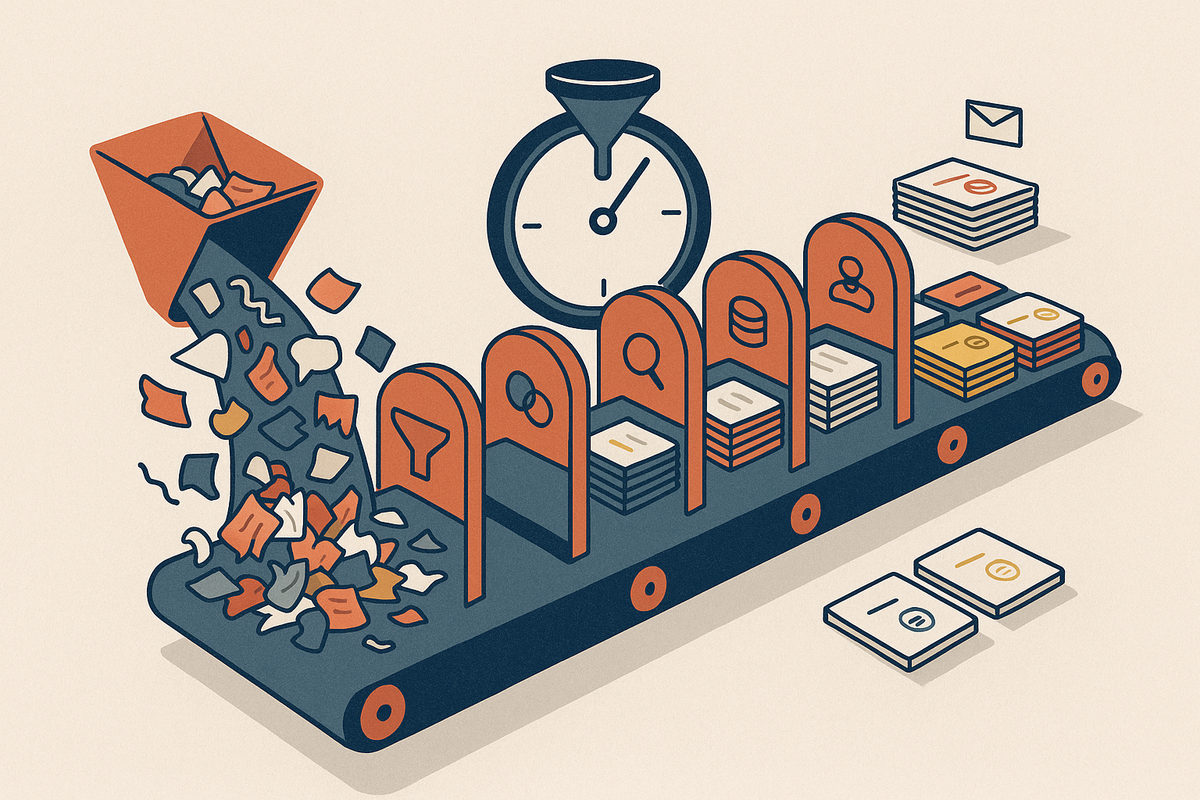
The 9-stage triage workflow moves every piece of feedback through capture, clean, classify, dedupe, enrich, route, decide, respond and close the loop, with a named owner and SLA at each step. You can run it in Google Sheets or Excel today. Both now offer native AI functions (an AI function through Gemini in Workspace, and the COPILOT() function in Excel), though availability depends on your plan and region, so check your licence.
Spreadsheet setup
Use one row per discrete item, not per message. Create these columns:
- ID, date received, source, raw text, cleaned text
- Type, parent item ID (for merges)
- Account, plan, ARR, segment
- Owner, status, acknowledged date, decision, closed-loop date
The workflow at a glance
| Stage | What happens | Owner | SLA | AI does well? | Human required for |
|---|---|---|---|---|---|
| 1. Capture | Pull every source into one sheet | Ops or rotating PM | Daily | Low value | Setting up intakes |
| 2. Clean | Strip noise, split multi-request messages | Triage owner | 1 business day | Yes | 10% spot-check |
| 3. Classify | Assign one of five types | Triage owner | Same day as clean | Yes | Low-confidence rows |
| 4. Dedupe | Match to existing items, set parent ID | Area PM | Weekly | Yes (suggestions) | Confirming merges |
| 5. Enrich | Attach account, plan, ARR, risk | CS ops | Weekly | Mostly | Ambiguous matches |
| 6. Route | Send to support, eng, PM, marketing | Triage owner | 2 business days | Yes | Edge cases |
| 7. Decide | Weekly review against a threshold | Accountable PM | Weekly | Ranking only | All decisions |
| 8. Respond | Acknowledge every sender | Support/CS | 2 business days | Routine drafts | Angry, enterprise, 'no' replies |
| 9. Close the loop | Notify linked accounts on release | PM + CS | 1 week after ship | Pulling lists | Message tone |
Stage 1: Capture
Set up one intake per source (support, sales and CS calls, Slack, in-app widget, surveys), all feeding one sheet. The owner is ops or a rotating PM, pulling daily. AI adds little here because this is plumbing. If your feedback is scattered, start with our guide on consolidating feedback from Slack, support and surveys into one place.
Stage 2: Clean
Strip signatures, legal footers, auto-replies, out-of-office messages and empty survey comments. Then split multi-request messages into separate rows that share the same source ID. Splitting must happen before classification, or minority items get buried under one label. AI is strong at both tasks. The triage owner spot-checks about 10% of rows within one business day.
Stage 3: Classify
Use five fixed types: request, bug, complaint, praise, question. Why five and not twenty? Agreement between labellers falls as category count rises. Twenty labels means two people tag the same message differently, and your trend lines turn into noise.
This is a standard document classification problem, and general-purpose LLMs handle it well with few-shot prompting. A 2023 PNAS study by Gilardi, Alizadeh and Kubli found zero-shot ChatGPT beat crowd workers on four of five text-annotation tasks, at under $0.003 per annotation. Classifying 1,000 items a week costs pennies. A prompt pattern you can copy:
You classify B2B product feedback into exactly one type.
Types:
- request: asks for new or changed functionality
- bug: something does not work as intended
- complaint: dissatisfaction without a specific ask
- praise: positive feedback
- question: asks how to do something
Examples (2 per type): [paste 10 labelled examples]
If none fit clearly, answer 'unsure'.
Return: type, confidence (0-1), one-line reason.
Feedback: [cleaned text]
Send low-confidence and 'unsure' rows to a human. Treat the confidence score as a routing signal, not a probability, because LLM self-reported confidence is poorly calibrated. Before trusting the output, hand-label a gold set of 50 to 100 rows and compare. Cohen's kappa above about 0.8 means your categories work. Re-run the gold set whenever you change the prompt or the model.
Stage 4: Dedupe and merge
Match each new item to an existing backlog item before creating a new one. If it matches, set the parent ID and add the new row as evidence. This is record linkage, also called entity resolution. Modern AI swaps string matching for semantic similarity using text embeddings, so 'CSV export' and 'download as spreadsheet' land close together with no shared keywords. Let AI suggest merges and have the area PM confirm them weekly. When in doubt, under-merge: a false split is cheap to fix later, but a false merge hides a distinct problem.
Stage 5: Enrich
Attach account name, plan, ARR, segment, lifecycle stage and a churn-risk flag from your CRM or billing system. AI is good at matching sender email or domain to an account. CS ops resolves ambiguous matches weekly. The churn-risk flag matters: Harvard Business Review reports that acquiring a new customer costs 5 to 25 times more than keeping an existing one.
Stage 6: Route
Questions go to support. Praise goes to marketing and CS. Bugs go to the engineering triage queue. Requests and complaints go to the owning PM. The triage owner routes within two business days of receipt.
Stage 7: Prioritise and decide
Hold a weekly 30-minute review with an explicit threshold. Example: 3+ distinct accounts, OR any account above a set ARR, OR a severity-1 bug, OR a churn-risk flag. Every item reviewed gets one decision: build, fix, defer with a revisit date, decline, or redirect to docs or a workaround. This stage is human only. AI can rank by evidence, but it cannot weigh strategy, engineering cost or commitments you have made.
Stage 8: Respond
Acknowledge every human sender of product feedback within a set SLA, such as two business days. Microsoft's State of Global Customer Service research found 77% of consumers view brands more favourably when they invite and accept feedback; it is consumer data, but the direction holds for B2B. AI can draft routine acknowledgements. A human writes replies to angry customers, enterprise accounts and anyone receiving a 'no'.
Stage 9: Close the loop
When something ships, use the parent ID to pull every linked account and notify them within a week of release. PM and CS share ownership. Bain's Frederick Reichheld found that a 5% lift in retention raises profits by 25% to 95%, and telling customers you acted is one of the cheapest retention moves available. For automation options, see how to close the customer feedback loop automatically.
What AI does and what humans own
- AI does well: splitting, cleaning, classifying, dedupe suggestions, account matching, drafting routine replies.
- Humans must own: merge confirmation, prioritisation, decisions, replies to upset or high-value customers.
Cadence: run stages 1 to 3 daily, stages 4 to 7 weekly, and stages 8 and 9 continuously.
Worked Example: 1,100 Inbound Items to 6 Decisions in One Week
This is an illustrative scenario that shows the mechanics, not a customer case study. The company is a hypothetical 120-person B2B SaaS team processing one week of inbound feedback.
Capture: 1,100 raw messages. Support tickets 520, in-app widget 160, sales and CS call notes 140, Slack relays from internal teams 180, NPS comments 100.
Clean: 140 noise items removed (auto-replies, 'thanks!', out-of-office, empty NPS), leaving 960. Splitting 85 multi-request messages adds 110 rows, for 1,070 discrete items.
Classify: questions 380 (routed to support), praise 90 (logged, sent to marketing and CS), bugs 240, requests 240, complaints 120. Product-relevant pool: 600.
Dedupe: the 600 items collapse into 151 unique issues. 104 match existing backlog items and add evidence; 47 are new.
Enrich and threshold: 38 of the 151 cross the bar. The other 113 are logged with evidence and get no action this week.
Route the 38: 17 bugs to engineering triage, 9 to support and docs fixes, 12 requests or complaints to PM review.
| Stage | Items in | Items out | What was removed or merged |
|---|---|---|---|
| Capture | 1,100 | 1,100 | Nothing; all sources pulled |
| Clean | 1,100 | 960 | 140 noise items |
| Split | 960 | 1,070 | +110 rows from 85 messages |
| Classify | 1,070 | 600 | 380 questions, 90 praise routed out |
| Dedupe | 600 | 151 | 449 merged as evidence |
| Threshold | 151 | 38 | 113 logged, no action this week |
| Weekly review | 38 | 6 product decisions | Bugs and doc fixes handled by owning teams |
Six items needed a real call in the review:
- CSV export timeout: 23 accounts, including 4 enterprise. Pulled into the current sprint.
- SSO on the mid-tier plan: 11 accounts, 2 flagged churn-risk. Moved up one quarter.
- Bulk edit: 7 accounts, all small. Deferred with a revisit date and a 15-account trigger.
- Permissions confusion: 14 questions misfiled as complaints. Docs rewrite owned by CS, no engineering work.
- Custom integration: demanded repeatedly by one large, very vocal account. Declined, with a workaround offered. This is the loudest-customer trap, avoided.
- Dark mode: 9 accounts, low revenue weight. Declined for now, with a reply explaining why.
Every human sender among the 600 product items gets an acknowledgement within two business days. Accounts linked to decisions 1 and 2 are tagged for loop closure when those ship.
The takeaway: the drop from 1,100 to 38 came mostly from cleaning, classifying out non-product items, and deduping, which are exactly the stages AI accelerates. The six decisions came from people.
Common Mistakes in Feedback Triage
The most damaging triage mistakes are process failures that no tool can fix, BuildBetter included. Watch for these:
- Treating classification as the goal. A perfectly tagged pile of 1,000 items is still a pile without dedupe and decisions.
- Too many categories. Twenty-plus tags means two people label the same message differently and trends become noise.
- Over-merging. Collapsing 'export is slow' and 'export is missing fields' into one item hides two different fixes.
- Counting votes, not accounts. One customer submitting five times is one signal, not five. Measure distinct accounts and their combined ARR.
- Weighting by ARR alone. This lets your biggest customer silently set the roadmap. It is the loudest-customer problem with a spreadsheet attached.
- No decision owner. Software does not make decisions. If the weekly review has no accountable PM, items rot regardless of tooling.
- Trusting AI on angry or high-stakes replies. Auto-drafted responses to frustrated enterprise customers damage relationships that took years to build.
- Skipping 'no' replies. Declining silently trains customers to stop giving feedback.
- Ignoring internal voice. Sales and CS hear the same requests on calls and in Slack. If that feedback never reaches the sheet, your counts are wrong from the start.
When Manual Triage Stops Working
As a rule of thumb, manual triage holds up to roughly 100 items a week with one owner. At a few minutes per item, that is already five or more hours a week. Past that point, time cost grows linearly with volume, and something gets skipped.
Dedupe and enrichment go first. They are invisible when skipped, so the backlog quietly fragments and loses account context. Teams keep classifying and stop knowing who asked.
Warning signs that you have crossed the line:
- Unread items older than a week.
- Duplicate items in the backlog.
- Nobody can answer 'how many accounts asked for X, and what is their ARR?'
- Loop-closure notifications have stopped going out.
1. BuildBetter — Best for Feedback Spread Across Calls, Tickets and Slack
BuildBetter automates stages 1 through 6 and stage 9 for B2B teams whose feedback lives in both internal conversations and external channels. It captures calls, support tickets, Slack and email through 100+ integrations, including Zoom, Slack, Zendesk, Intercom, HubSpot, Salesforce and Jira. Inbound feedback is split and deduplicated into signals tied to accounts, with CRM enrichment attached. From there you can generate Linear and Jira tickets and PRDs with the evidence included, and Close the Loop notifies customers when a linked item ships.
The distinguishing feature is internal plus external data together: the sales call where a prospect mentioned SSO sits next to the support tickets asking for it, under one account.
Honest caveat: it is not purpose-built for enterprise-scale survey distribution, very-high-volume public review mining, or a dedicated research-repository workflow. Specialist tools go deeper there.
Other Tools Worth a Look
2. Featurebase
Public feedback boards with voting, roadmap and changelog. Good for teams that want customers to submit and upvote ideas directly.
3. Savio
Centralises feedback from support and CRM tools and attaches revenue data to requests. Good for teams prioritising by customer value.
4. Frill
Lightweight idea board, roadmap and announcements. Good for small teams that want a simple public portal.
| Tool | Stages covered | Best fit |
|---|---|---|
| BuildBetter | Capture, clean, classify, dedupe, enrich, route, close the loop | B2B teams with feedback in calls, tickets, Slack and email |
| Featurebase | Intake, voting, changelog | Public idea boards |
| Savio | Centralise, revenue weighting | Value-based request tracking |
| Frill | Intake, roadmap, announcements | Small teams, simple portal |
How to choose
Map the tool to the stage you are currently skipping. Gaps in capture and enrichment point to integration-heavy platforms. Gaps in intake and voting point to boards. None of these replaces stage 7. Decisions stay with people.
FAQ: Processing User Feedback With AI
What is the best way to process user feedback with AI?
Use AI for the mechanical stages: cleaning, splitting multi-request messages, classifying into a small fixed set of types, deduplicating against the backlog, and matching feedback to accounts. Keep prioritisation, decisions and sensitive replies with an accountable human owner.
What categories should I use to classify customer feedback?
Start with five types: request, bug, complaint, praise and question. Fewer categories produce more consistent labels. Add product-area tags as a separate field only once the five types are stable, ideally at a Cohen's kappa of 0.8 or higher on a 50-row test.
How much feedback can one person triage manually?
Roughly 100 items a week. At a few minutes per item that is already 5+ hours. Beyond that, deduplication and enrichment are usually dropped first, which fragments the backlog and hides which accounts asked.
Can AI prioritise feedback for me?
AI can rank items by evidence: number of distinct accounts, combined ARR, severity and churn risk. It cannot weigh strategy, engineering cost or commitments, so the final decision should stay with a product owner in a weekly review.
How quickly should we respond to user feedback?
Acknowledge every human sender within a fixed SLA, typically 2 business days. Notify linked customers within a week of the item shipping, and tell people when their request is declined.
What tools are best for processing user feedback with AI?
BuildBetter for teams that need calls, tickets, Slack and email captured and deduplicated in one place, with automatic loop closure. Featurebase, Savio and Frill suit lighter-weight boards and revenue-weighted request tracking.
Sources and Further Reading
- Triage: the medical sorting concept this workflow borrows from.
- Voice of the customer: the research discipline triage supports.
- Record linkage: the concept behind deduplication and merging.
- Document classification: background for AI feedback classification.
- Service-level agreement: background for per-stage SLAs.
- Gilardi, Alizadeh and Kubli, 'ChatGPT outperforms crowd workers for text-annotation tasks', PNAS (2023).
- Amy Gallo, 'The Value of Keeping the Right Customers', Harvard Business Review (2014).
- Related guides: How to consolidate customer feedback from Slack, support and surveys and How to close the customer feedback loop automatically.
Make Churn Optional
The spreadsheet workflow will carry you a long way. When volume outgrows one owner, BuildBetter captures every call, ticket and Slack thread, dedupes it into account-weighted signals, and tells customers when you ship what they asked for. You keep the decisions; the busywork goes away.