What Is a Product Factory? How to Build One With AI Agents (2026)
A product factory turns AI-assisted building into better customer outcomes. The 6-part method: inputs, contributors, guardrails, release, and follow-up.
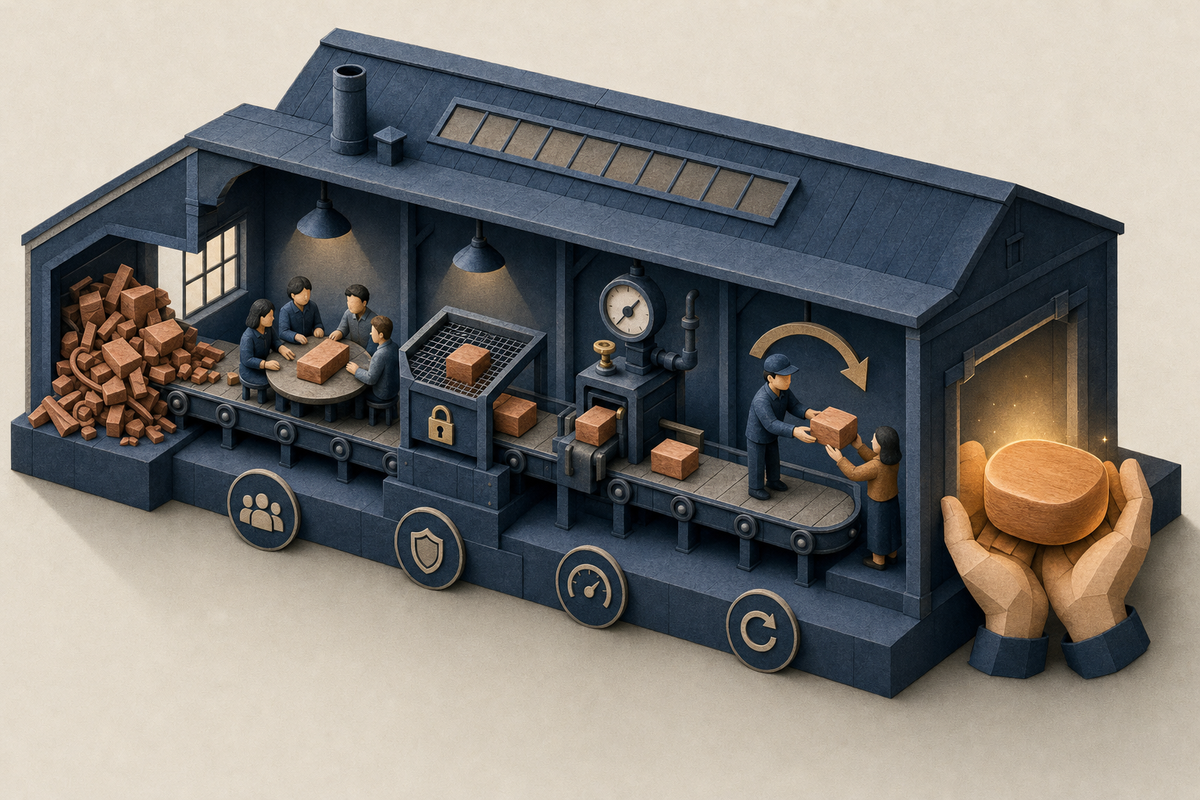
Your designer opens pull requests. Your CS lead used an AI coding agent to fix a settings page last Tuesday. Support patched a confusing error message before lunch. Output is up and PR counts are up, but nobody on the team can say whether customers are better off. This guide explains how to turn that new building capacity into better customer outcomes. It follows the method in Ship First: How to Build Self-Improving Products by Spencer Shulem, BuildBetter's founder, and covers the method, safeguards, release pacing, and a worked example.
What Is a Product Factory? (Definition)
A product factory is a repeatable system that turns a team's AI-assisted building capacity into consistently better customer experiences, rather than more features. Reviewing the solution, helping customers use it, and following up on what still gets in their way are part of how the team ships. None of them is left as an afterthought once the code merges.
Experience has a specific meaning here. In Ship First, an experience covers four stages:
- Discover: how someone finds out a capability exists
- Start: how they begin using it
- Get a result: whether they finish the job they came to do
- Handle a problem: what happens when something goes wrong
A product factory improves all four stages. Most teams only speed up the build step.
The core tension is simple. AI makes it easy to produce a lot of software quickly, including a lot of bad software. If every suggestion becomes another feature, customers get more work to do inside a more complicated product.
Ramp made “product factory” a searchable term. For that story, read how Ramp built an AI product factory for internal tools. This page covers the method.
A product factory = broad participation + engineering safeguards + customer-matched release + follow-up that feeds the next change.
Product Factory vs. Feature Factory: What's the Difference?
A feature factory measures output. A product factory measures whether the customer's experience improved. John Cutler popularized “feature factory” in his 2016 post 12 Signs You're Working in a Feature Factory. He described teams that celebrate shipping, skip follow-up after launch, and lose the connection to the problem they were supposed to solve. A product factory counts different things: successful work, less recurring friction, better performance, and less rework or support effort.
| Dimension | Feature factory | Product factory |
|---|---|---|
| Unit of work | A new feature | An experience improvement, including fixes and simplifications |
| Who contributes | Engineers only | Anyone closest to the problem, behind engineering safeguards |
| Release model | Ship to everyone at once | Requesters first, behind a feature flag |
| Success signal | The launch happened | The customer got the result |
| A missed case | Becomes a bug ticket | Becomes a new engineering check or an updated reusable skill |
In a product factory, a prompt bug fix or a simpler workflow can matter more than a new launch. Much of the team's capacity goes into improving what customers already use. A setting that takes three clicks instead of nine changes the daily work of every admin who touches it. Another new feature may only add one more thing to learn.
AI turns a feature factory into a faster feature factory unless the team changes what it counts.
Why Building a Product Factory Is Hard: What Breaks First
Most teams adopting AI coding agents hit the same six failure modes, usually in this order.
1. The interpretation gap
Product has an idea and the rest of the org interprets it. More agent output makes the gap wider, because there are more interpretations shipping at once. The fix is to make a working version the shared artifact, so people review real behavior instead of arguing about a spec.
2. Participation without safeguards
Designers, CS, or support ship AI-generated code with no review path. Nobody clearly owns production quality, and regressions show up in customer accounts first.
3. Customer saturation
The team's capacity to build grows much faster than customers' capacity to adopt. Trying every change you ship is not the customer's job. When everything goes to everyone, customers have to find the few changes that matter to them.
4. Lost context
The original customer conversation gets separated from the change. Nobody knows who asked, why it mattered, or whom to tell when it ships.
5. Lessons that don't compound
The same class of mistake comes back because each miss gets patched and never becomes a check or a reusable instruction.
6. Mistaking speed for productivity
Faster-feeling work still needs measurement. In METR's July 2025 randomized trial, experienced open-source developers working on mature repositories they knew well took 19% longer to finish tasks when allowed to use AI tools. Before starting, they expected a 24% speedup. Afterward, they still believed AI had sped them up by about 20%. METR cautions that the results may not generalize to other settings or later models, and it has since published a follow-up that revisits the findings with newer tools.
How to Build a Product Factory: The 6-Part Method
The method below follows Ship First: How to Build Self-Improving Products by Spencer Shulem, a short companion to Customer-Led Development. Every step works manually. You can start this week with a spreadsheet, your existing code review, and a feature flag.
Step 1: Define What Goes In (Inputs)
Inputs are customer problems with their original context attached. That context includes the conversation, the customer's workspace situation, and who raised the problem. A feature idea with the context stripped out is not an input. It is a guess that has lost its evidence.
Common sources:
- Customer calls
- Support tickets
- CS notes and account reviews
- The team's own use of the product (dogfooding)
The book adds a caveat about dogfooding. Your own experience is useful, but it can miss the customer's permissions, scale, habits, or expectations. Dogfooding supplements customer evidence and never replaces it.
Manual practice: keep a log with five columns: problem, customer quote, account, requester(s), and the experience stage affected (discover / start / get result / handle problem). For a look at how teams automate this path, see software that turns customer conversations into shipped features.
Step 2: Decide Who Can Contribute
The person closest to the problem should be able to propose the fix as a working change the team can review, with the original context attached.
Shulem writes that at BuildBetter the designer creates pull requests to the core product and makes UI/UX improvements directly in code. According to his account, this has replaced Figma as the designer's day-to-day delivery environment, and customer success and support can contribute too. Treat this as one team's practice, not a benchmark.
It works because a working version gives product and engineering one thing to examine together. Improvements spend less time waiting in translation between the person who heard the problem and the person who builds the fix.
Manual setup:
- List who may open PRs.
- Mark which areas of the codebase are open to non-engineers (for example, UI copy, settings pages, and empty states).
- Name an engineering pair for each contributor to call when they get stuck.
Step 3: Set the Checks Every Change Passes (Guardrails)
The technical team owns the safeguards: audits, code review, and engineering checks. Broader participation must not blur who is responsible for production quality. All AI-generated code goes through the team's normal review process, and technical help comes in where needed.
Guardrails checklist:
- Automated tests and CI checks pass.
- An engineer reviews any change touching production paths.
- Design review signs off on UX changes.
- The change links to the originating customer problem.
- The change ships behind a feature flag when exposure should be phased.
- A rollback is defined before merge.
- The flag has a retirement date after broad rollout. Pete Hodgson's guidance on martinfowler.com warns that every toggle is debt until it is removed.
Compounding rule: every missed case becomes a new engineering check or an update to a design-review skill, so the lesson carries into the next project.
In Ship First, a skill is a reusable set of instructions an agent follows for a kind of work. Maintain skills for research, design, engineering, and prototyping. In Anthropic's implementation, each skill is a folder with a SKILL.md file. See the Agent Skills overview for details.
Step 4: Get Work to Production With Separate Decisions
Deployment, exposure, notification, and adoption are four separate decisions, and broader rollout follows evidence about the intended job.
| Decision | Question it answers | Example |
|---|---|---|
| Deployment | Is the code live? | Merged and deployed Thursday morning |
| Exposure | Who can see it? | Only requesting accounts, behind a flag |
| Notification | Who is told, and how? | Personal note to each requester with a short walkthrough |
| Adoption | Did they get the result? | Requesters complete the task without help |
The industry term for separating deployment from release is progressive delivery. A bug fix can improve the product right away with no announcement. A new workflow may need onboarding timed to when the customer's team can actually use it.
Use the time AI saves to try alternatives and fix the details while the customer's need is still fresh. Ryan Singer's Shape Up chapter on setting boundaries treats appetite as a constraint on scope. Building now costs less, but absorbing changes costs the customer as much as it always did. Apply appetite to customer attention too.
Step 5: Release at a Pace Customers Can Absorb
Start with the people who asked. For each release, identify the requesters and send each one a personalized message. Tell them the thing they asked for is available, link the relevant tutorial or docs, and offer setup help. Shulem writes that BuildBetter's close-the-loop experience connects changelog releases to the customer conversations that motivated them.
Track what each account has been asked to adopt. If several changes hit the same account, decide which job matters most and coordinate how you introduce them.
A quiet week with one relevant improvement can create more value than a long list of releases nobody has time to investigate.
How fast is too fast? Shipping is too fast when announcements outpace an account's capacity to learn new workflows. The limit applies per customer, not per team. Watch for three warning signs:
- Announcements that go unopened
- New workflows that go unused
- Support questions about changes the customer didn't ask for
Step 6: Keep the Customer in the Loop and Follow Up
Follow-up calls are part of the development loop. Shulem writes that BuildBetter offers weekly check-ins to any customer who wants them, gives large customers priority for that cadence, and has customers talk directly with a product person. On those calls the team hears what happened in the customer's workspace, shows what changed, demos work in progress, and finds what still doesn't fit. Teresa Torres makes the same case in her writing on continuous discovery: the people building the product should be talking to customers every week.
Three-part routine:
- Before the call: review what the customer tried and what is still unresolved.
- During the call: let the customer demonstrate the actual work. Don't settle for a summary.
- After the call: decide whether each open question needs a prototype, a working release, or a clarifying question.
Offer two modes: frequent collaboration, or a fix plus a clear explanation. Let customers choose the cadence that helps them.
Measure the factory by successful work, less recurring friction, better performance, and less rework or support effort. PR count is not a measure of success. Align incentives so the people who hear the problem and the people who solve it are working toward the same result.
Worked Example: A Small Team's First Month Running a Product Factory
This example is illustrative. The team and numbers are hypothetical, not BuildBetter data.
Setup: a 7-person B2B SaaS team (3 engineers, 1 designer, 1 PM, 1 CS lead, 1 support specialist) serves about 60 accounts. In month one, 4 non-engineers get permission to open PRs in the UI and settings areas, with engineering review on every change.
Month-one totals: 41 change proposals logged. 29 merged after review, 8 sent back for rework, and 4 rejected. Of the 29 merged, 18 were fixes or simplifications to existing workflows and 11 were new capabilities.
One change, end to end:
- Input: On Tuesday's check-in, the CS lead hears that admins at 5 accounts can't find where to assign report permissions. 2 of those accounts opened tickets that week. She logs the problem with call quotes and account names, then uses an agent to draft a PR that moves the permission control onto the report page.
- Checks: CI passes. An engineer flags a missing edge case for read-only roles. The fix goes in, and the team writes a new automated check for role coverage so the miss can't recur. The designer updates the design-review skill.
- Release decisions: Deploy Thursday. Expose behind a flag to the 5 requesting accounts only. Send each requester a personal note with a 90-second walkthrough and an offer of setup help. Hold notification for the other 55 accounts.
- Result after 10 days: 4 of 5 accounts assign permissions without help. 1 needs a call. Related tickets drop to 0 for those accounts. The call shows that the fifth account uses custom roles.
- Decision: No broad announcement yet. The team fixes the custom-role case first, then exposes the change to everyone with an in-product hint instead of a changelog blast. Three accounts already received two other releases that week, so their notice waits one week.
Takeaways:
- The change went from request to release in 3 days.
- One missed case became a permanent check.
- Broad rollout waited for evidence that the experience worked.
Common Mistakes When Building a Product Factory
Most product factory failures come from counting the wrong thing or skipping a release decision. These are the mistakes to watch for:
- Counting PRs or deploys as success. Volume is an input, not an outcome.
- Opening contribution without clear production ownership. Everyone can propose a change, and engineering stays accountable for quality.
- Shipping everything to everyone. This causes saturation, and customers stop reading release notes.
- Treating deployment and announcement as the same event. A quiet fix and a new workflow need different rollouts.
- Losing the requester. If you can't say who asked, you can't close the loop or judge the result.
- Fixing a miss without encoding it. If the miss doesn't become a check or a skill, it will happen again.
- Relying only on dogfooding. Your team's workflow does not reflect the customer's permissions, scale, or habits.
- Spending all new capacity on launches. Fixes and simplifications to existing workflows often deliver more value.
- Leaving flags in place forever. Retire each flag after broad rollout, or the toggles pile up as debt.
When You Need Tooling (and Which Tools Help)
A spreadsheet and a shared doc work until manual requester tracking starts to slip. As a rule of thumb, that happens once you track requesters across more than about 30 to 50 active accounts, log well over 100 customer problems a month, or ship several customer-facing changes a week.
Signs you've hit the limit:
- You can't say who asked for a change.
- Announcements go out without requester lists.
- Call context is lost before the PR is opened.
Tools that help:
- BuildBetter: captures calls, Slack threads, tickets, and surveys in one place. It links customer conversations to product decisions and drafts PRDs, tickets, and loop-closure emails to requesters when a change ships. It is not a feature-flag or CI system, so pair it with one.
- PostHog: feature flags plus session replay to check whether requesters actually completed the job.
- Unleash or GrowthBook: open-source feature flagging for phased exposure.
- GitHub Actions (or your CI): enforces the checks every change has to pass.
- Agent skill files (e.g., Claude Agent Skills): package reusable research, design, and engineering instructions.
Product Factory FAQ
What is a product factory?
A product factory is a repeatable system that turns AI-assisted building capacity into consistently better customer experiences. It combines broad participation, engineering safeguards, customer-matched releases, and follow-up on what still gets in customers' way.
How is a product factory different from a feature factory?
A feature factory optimizes output: features launched, tickets closed. A product factory optimizes customer results: successful work, less recurring friction, better performance, and less rework or support effort. Fixes and simplifications count as much as new launches.
Where did the term “product factory” come from?
Ramp popularized it through its account of building internal tools with AI. “Feature factory,” the term it contrasts with, was popularized by John Cutler in 2016.
Can non-engineers ship code in a product factory?
Yes. Designers, CS, and support can propose working changes with customer context attached. All AI-generated code goes through the team's normal review, and engineering keeps responsibility for production quality.
What guardrails does a product factory need?
It needs passing CI and automated tests, engineer review for production paths, design review for UX changes, a link to the originating customer problem, feature flags for phased exposure, and a defined rollback. It also needs a rule that every missed case becomes a new check or an updated reusable skill.
How fast is too fast to ship?
Shipping is too fast when an account is asked to adopt more than its team has room to learn. Release to requesters first, coordinate changes per account, and broaden rollout only after you have evidence that the experience works.
Do I need special software to build a product factory?
No. The method runs on a problem log, code review, feature flags, and personalized follow-up. Tooling helps once manual requester tracking stops scaling.
Sources and Further Reading
- Ryan Singer, Shape Up, Chapter 3: Set Boundaries: https://basecamp.com/shapeup/1.2-chapter-03
- Teresa Torres, Product Talk, Getting Started with Discovery: https://www.producttalk.org/getting-started-with-discovery/
- METR, Measuring the Impact of Early-2025 AI on Experienced Open-Source Developer Productivity: https://metr.org/blog/2025-07-10-early-2025-ai-experienced-os-dev-study/
- METR, 2026 uplift update: https://metr.org/blog/2026-02-24-uplift-update/
- Anthropic, Agent Skills overview: https://platform.claude.com/docs/en/agents-and-tools/agent-skills/overview
- Wikipedia, Feature toggle: https://en.wikipedia.org/wiki/Feature_toggle
Make Churn Optional
A product factory only works if every change stays tied to the customer who asked for it. BuildBetter keeps call, ticket, and Slack context attached from first mention to shipped fix, then helps you tell the right customers when it's live.
Make churn optional. Book a demo.
Get Ship First
This method comes from Ship First: How to Build Self-Improving Products by Spencer Shulem: 24 short chapters on going from a customer request to a working release. Get the free PDF or EPUB, or read it on Kindle.